
Overview, Activity, Referrals
who reads, is it real, what comes back.
The three read-only screens under CryptoMeter in the WordPress sidebar. Every number comes from your own database; there is no sample data.
01Overview
CryptoMeter → Overview answers three questions: who is reading, is it real, and what comes back. All numbers come from your own database; there is no sample data.
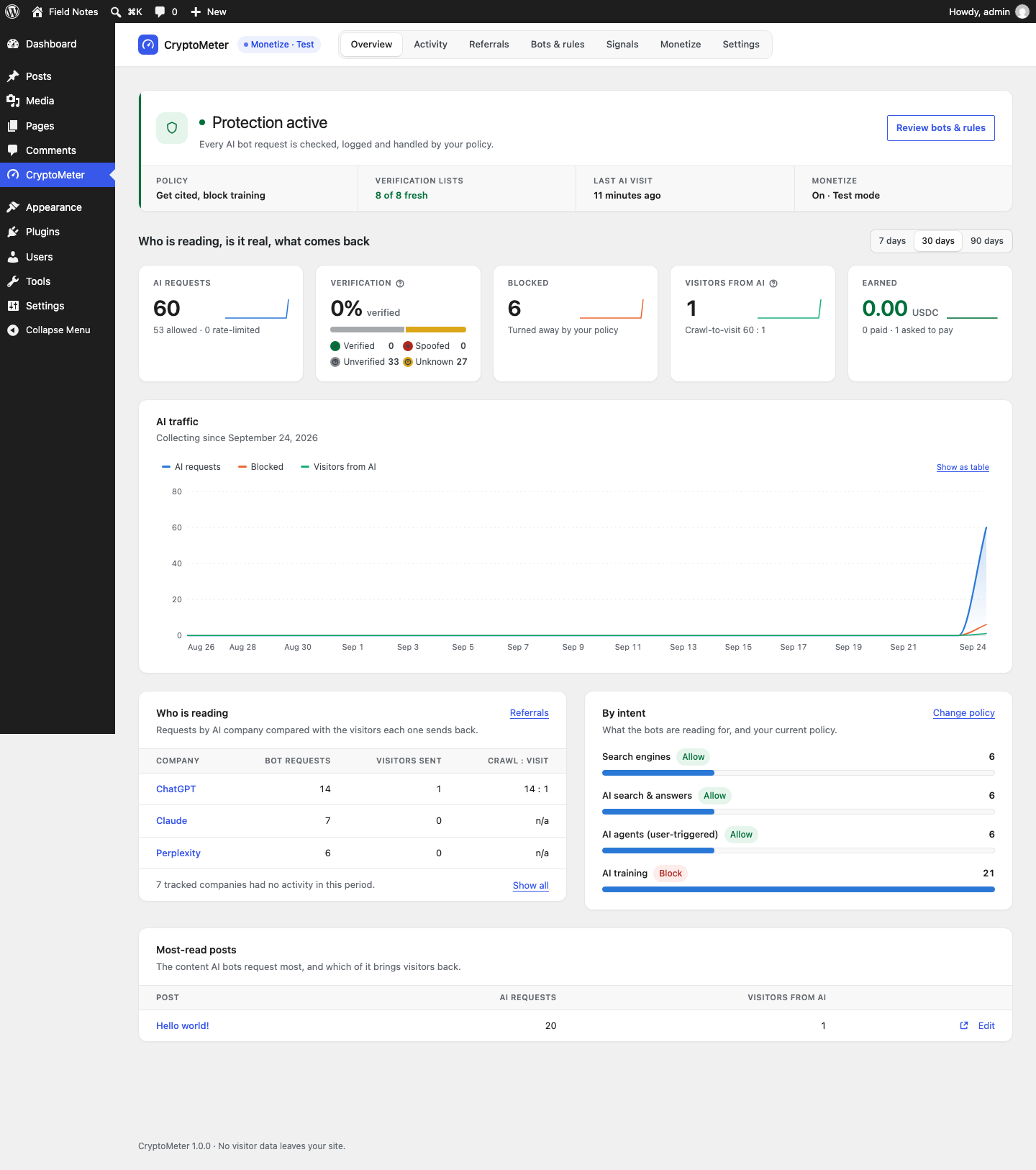
Status band
Protection active ("Every AI bot request is checked, logged and handled by your policy."), Protection paused (CryptoMeter is switched off under Settings → General) or Setup needed. Below it: the current Policy (preset name, or "Custom policy"), Verification lists (for example "8 of 8 fresh"), Last AI visit and Monetize (Off, On · Test mode, On · Live). If a page-cache plugin is detected, a warning links to Open server & cache rules.
Cards (7, 30 or 90 days, UTC days)
| Card | Exact meaning |
|---|---|
| AI requests | Every logged bot request except genuine search engines: AI crawlers and agents, generic HTTP clients (curl, python-requests and similar), and search-engine user agents that failed verification. Sub-line: allowed and rate-limited. |
| Verification | Share verified, with counts for Verified, Spoofed, Unverified and Unknown. |
| Blocked | Requests turned away by your policy (HTTP 403). |
| Visitors from AI | Referred visitors counted by the beacon, with the overall crawl-to-visit ratio. A minimum, see Referrals. |
| Earned (only with Monetize) | USDC from settled payments; "paid" and "asked to pay" counts. |
| Ignored robots.txt (without Monetize) | Requests for URLs your robots.txt disallows for that bot; sub-line: bytes served to bots. |
Chart and tables
- AI traffic: daily AI requests, blocked requests and visitors from AI, "Collecting since" the first logged request. Show as table shows the same data as a table.
- Who is reading: per AI company, Bot requests, Visitors sent and Crawl : visit. Inactive companies are hidden behind Show all.
- By intent: requests per intent with the current policy; Change policy opens Bots & rules.
- Most-read posts: the content AI bots request most, and which of it brings visitors back.
02Activity
CryptoMeter → Activity lists every request from an AI bot or crawler. Human visitors and logged-in users are never logged, and IP addresses are shortened to their network prefix (IPv4 /24, IPv6 /48).
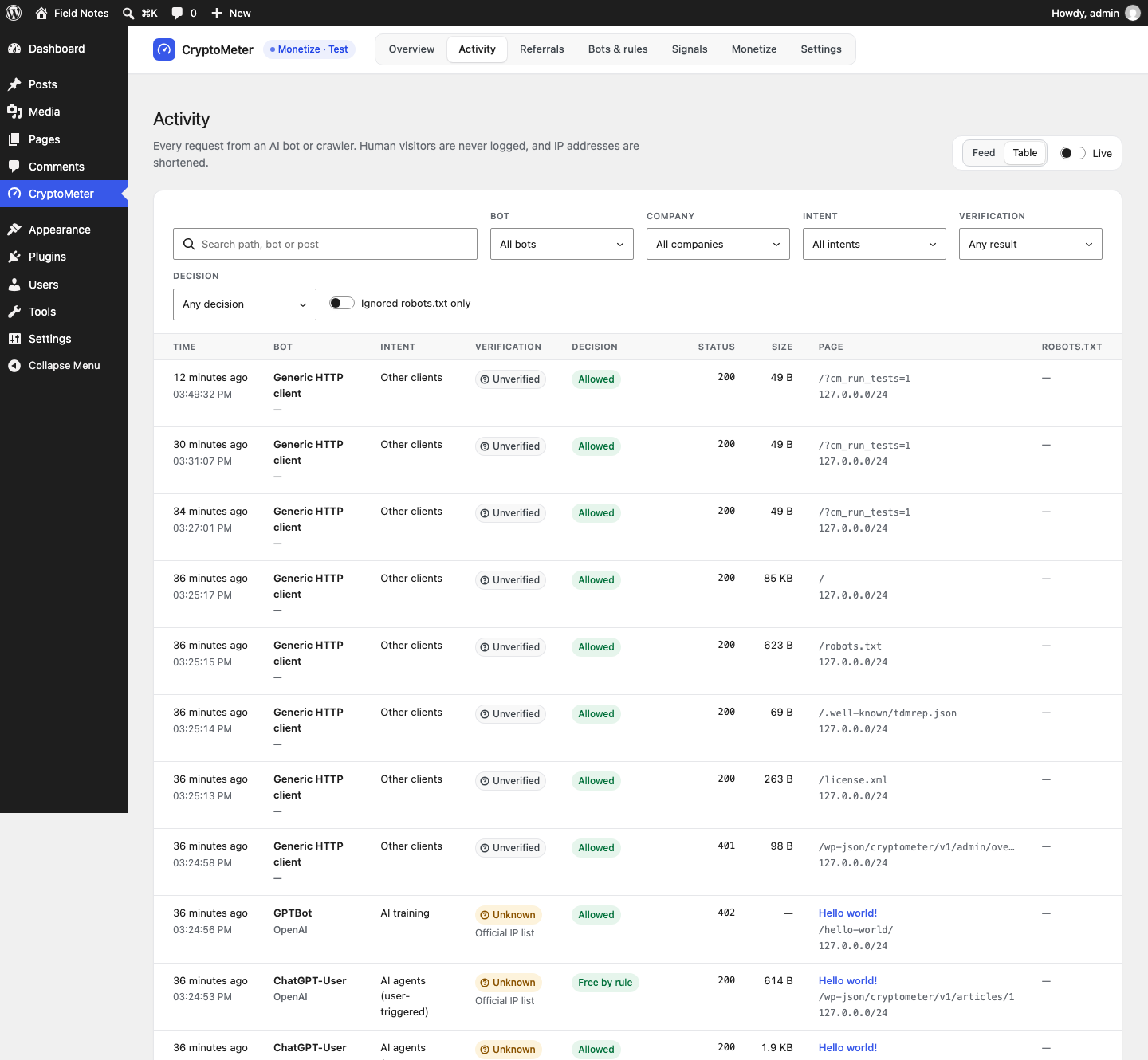
- View: Feed or Table. Live polls for new requests every 5 seconds ("Updating every 5 s"), paused while the browser tab is hidden.
- Filters: search (path, bot or post), Bot, Company, Intent, Verification, Decision, and Ignored robots.txt only. Clear all filters resets them.
- Columns: Time, Bot (and company), Intent, Verification (verdict and method), Decision, Status (HTTP code), Size (bytes sent), Page, robots.txt (Ignored or Respected).
Decisions
| Label | Meaning |
|---|---|
| Allowed | The bot read the page (policy Allow). |
| Blocked | HTTP 403 (policy Block, per-post block, or spoofed bot). |
| Rate-limited (429) | Over a per-bot limit, or (Monetize) the per-IP limit for unpaid requests. |
| Passed (search) | A search engine; passes untouched. |
| Free by rule | An access rule made the read free (allowlisted IP or user agent, excluded path or category, short post, daily free reads). |
| Asked to pay (402), Paid, Access pass, Payment failed, Not charged (no wallet) | Monetize only. See The HTTP 402 flow. |
The log keeps 90 days by default (Settings → General → Retention).
03Referrals
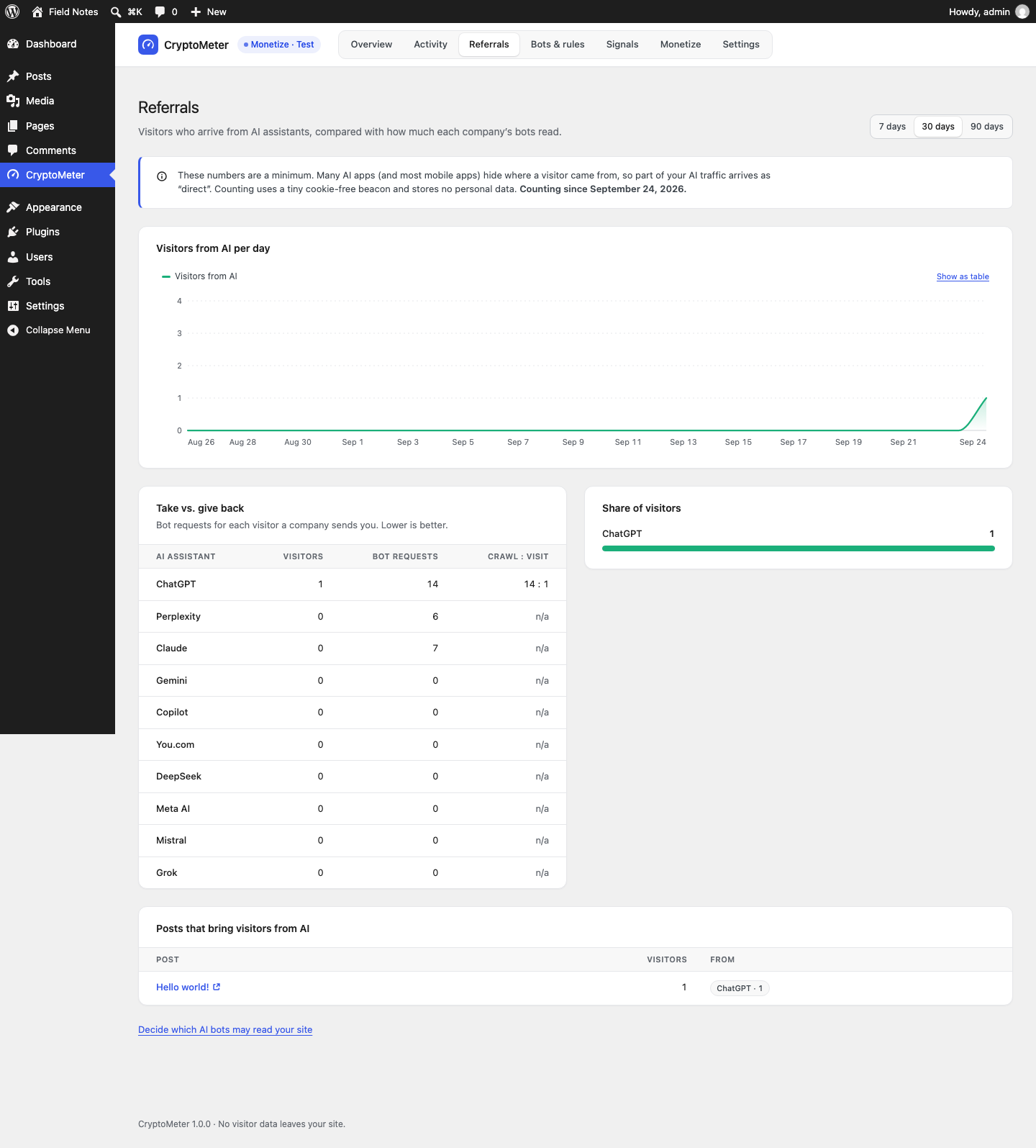
CryptoMeter → Referrals shows visitors who arrive from AI assistants, compared with how much each company's bots read.
How visitors are counted
- A tiny inline script (under 1 KB) runs on the front end for visitors who are not logged in. It only sends something when the referrer host or the
utm_sourceparameter matches a known AI assistant. - It posts the page path, the assistant host and the
utm_sourcevalue to/wp-json/cryptometer/v1/beaconwithnavigator.sendBeacon. Because the visitor's browser sends it, it also works when the page itself came from a page cache. - No cookies, no IP address stored, no personal data. Only day × assistant × post counters are saved. A salted hash of the IP is kept for 2 minutes to limit one visitor to 30 beacons per minute.
- Switch it off under Settings → General → Count visitors from AI assistants.
Recognised assistants
| Assistant | Referrer host / utm_source | Compared with the bots of |
|---|---|---|
| ChatGPT | chatgpt.com, chat.openai.com | OpenAI (all OpenAI bots) |
| Perplexity | perplexity.ai | Perplexity |
| Claude | claude.ai | Anthropic |
| Gemini | gemini.google.com | Google's AI bots only (GoogleOther, Google-CloudVertexBot), not Googlebot |
| Copilot | copilot.microsoft.com | Microsoft (the only Microsoft bot in the list is Bingbot) |
| You.com | you.com | You.com (YouBot) |
| DeepSeek | chat.deepseek.com | no known crawler: ratio n/a |
| Meta AI | meta.ai | Meta |
| Mistral | chat.mistral.ai | Mistral |
| Grok | grok.com | no known crawler: ratio n/a |
Take vs. give back lists visitors, bot requests and Crawl : visit per assistant ("Lower is better"). The ratio shows n/a when there are no visitors yet or no known crawler. On low-traffic sites the ratio is noisy; look at the raw counts too.
The referral counter is a public, cookie-free endpoint (like any analytics beacon). It accepts only known AI referrers and is rate-limited, but someone could still inflate it on purpose. Treat the numbers as a trend and a minimum, not as audited traffic.