CryptoMeter
Self-hosted AI traffic control for WordPress. See which AI bots really are who they claim to be, what each company's bots take compared with the visitors it sends back, and apply one policy across robots.txt, AI licensing signals and your server. No account, no monthly fee, no visitor data leaves your site. Optional: let x402-capable AI agents pay per article.
1.Overview and honest expectations
CryptoMeter runs inside your WordPress site. It watches every request from a bot or AI crawler (human visitors are never logged), checks whether the bot is genuine, applies the policy you choose, and shows the result in its own admin area under CryptoMeter in the WordPress sidebar.
What it does
- Verified bot identity. Each bot request is checked against the vendor's official published IP list (OpenAI, Perplexity, Anthropic, Google, Microsoft), forward-confirmed reverse DNS (search engines and Google's AI crawlers), or a Web Bot Auth signature (RFC 9421, Ed25519, currently used by ChatGPT). Every request gets a verdict: Verified, Spoofed, Unverified or Unknown.
- Activity log and live feed. Every bot request with bot, intent, verdict, decision, status code, bytes served, page and the network prefix of the IP (never the full address).
- AI referral tracking. Visitors who click through from ChatGPT, Perplexity, Claude, Gemini, Copilot and five more assistants are counted per page and compared with how much each company's bots crawl (the crawl-to-visit ratio).
- robots.txt violation detector. Flags requests for paths that the bot's own robots.txt group disallows.
- One policy, every signal. From one screen: robots.txt
Content-Signal, IETFContent-Usage(draft), RSL/license.xml, TDMRep/.well-known/tdmrep.jsonand optionalnoaitags, with a preview before you publish. - Policies per intent (Search engines, AI search & answers, AI agents, AI training) with per-bot exceptions and per-bot rate limits. Block is enforced by WordPress with HTTP 403 and written to robots.txt.
- Server and cache rule snippets for Nginx, Apache, LiteSpeed, Cloudflare and WP Rocket, generated from your block list.
- Weekly report and spike alert by e-mail, plus an HTTPS webhook.
- Monetize (optional, off by default). Bots you set to Charge receive an HTTP 402 x402 payment request; x402-capable agents pay in USDC straight to your own wallet.
- Signals are declarations, not protection. robots.txt, Content Signals, Content-Usage, RSL, TDMRep and noai tell bots what you allow. Bots that respect them follow them; others ignore them. What CryptoMeter enforces is the Block policy (HTTP 403) for requests that reach WordPress, plus any server rules you choose to install.
- Referral counts are a lower bound. Many AI apps (and most mobile apps) hide where a visitor came from, so part of your AI traffic arrives as "direct" and cannot be counted.
- Unverified does not mean spoofed. A bot whose company publishes no IP list, DNS or signature method can only be "Unverified". An IP that cannot be judged (private or proxy address, list not fetched yet, DNS failure) is "Unknown". Only a definite failed check is "Spoofed".
- User agents can be faked, and bots that pose as normal browsers are not recognised as bots. CryptoMeter classifies by user agent (or signature) and then verifies; it is not a general bot-management firewall.
- Page caches that answer before WordPress runs hide those requests from CryptoMeter. See Page caches.
- Monetize is revenue-ready, not an income product. x402 is young and few AI agents pay today. No earnings are promised.
How a bot request flows
What is included, and what is not
| Included | Not included |
|---|---|
|
|
Words used in this guide
| Term | Meaning |
|---|---|
| Bot / crawler / agent | Automated software that requests web pages: to train AI models, to build a search or AI-answer index, or to fetch a page because a person asked an assistant. |
| Intent | What a bot is reading for: Search engines, AI search & answers, AI agents (user-triggered) or AI training. Generic HTTP clients appear as Other clients. |
| Policy | Allow, Block or (only with Monetize) Charge. Set per intent, with per-bot exceptions. |
| Verdict | Result of the identity check: Verified, Spoofed, Unverified or Unknown (see Verification explained). |
| Referral | A human visit that arrived from an AI assistant (by referrer host or utm_source). |
| Crawl-to-visit | A company's bot requests divided by the visitors its assistant sent you. 14 : 1 means 14 bot requests per referred visitor. |
| x402 | An open protocol that uses HTTP status 402 ("Payment Required") so software can pay for a web resource (x402.org). Only relevant to Monetize. |
2.Requirements
| Item | Requirement | Notes |
|---|---|---|
| WordPress | 6.6 or newer | The admin app needs WordPress 6.6 (below it, the CryptoMeter page shows a notice; bot rules and signals keep working). Tested with WordPress 7.1.2. |
| PHP | 7.4 or newer | Verified on PHP 7.4.33 and PHP 8.4.25 (WordPress Playground). |
| Database | The normal WordPress database | Tables are created with the standard WordPress dbDelta API. All recorded test runs used SQLite in WordPress Playground. MySQL/MariaDB has not been tested yet, although it is the normal WordPress database. |
| Browser | A current browser with JavaScript | The admin screens are a React app built on WordPress's own components. |
| PHP sodium extension (recommended) | sodium_crypto_sign_verify_detached | Needed to verify Web Bot Auth signatures (and Ed25519 Coinbase CDP keys). Present on most PHP 7.2+ hosts. Without it, signed requests fall back to IP/DNS checks. |
| Outbound HTTPS | Your server can reach the official IP list URLs | See External services. If blocked, lists stay "Not fetched yet" and verdicts become "Unknown", never "Spoofed". |
| WP-Cron | Working WP-Cron or a real cron job | Daily list refresh and pruning, hourly spike check, weekly report. |
| Pretty permalinks (recommended) | Settings → Permalinks not "Plain" | Needed for /llms.txt, /license.xml and /.well-known/tdmrep.json on most servers. |
| Page cache | Must let AI bots reach WordPress | See Page caches. |
| Monetize only | A public EVM wallet address; outbound HTTPS to your facilitator | Optional. PHP DOM extension recommended (clean Markdown for paying agents). Node.js only for the demo client. |
You can check most of these at any time under CryptoMeter → Settings → Tools & status → System status.
WordPress Multisite has not been fully tested. The uninstall routine cleans up every site in a network (code read, not run on a network). Activate the plugin per site and test on a staging copy first.
3.Quick start (10 minutes)
- Install and activate (Plugins → Add New Plugin → Upload Plugin → choose
cryptometer.zip→ Install Now → Activate). You land on CryptoMeter → Overview. - Set up. In the Set up CryptoMeter card pick a preset. Get cited, block training is recommended and already active from the moment you activate. Leave Also let AI agents pay per read (optional) off unless you want Monetize. Press Apply and start.
- Load the official IP lists. Open Bots & rules → Verification sources and press Refresh now. Each list should show a green tick and a number of IP ranges. (They also refresh by themselves once a day.)
- Check your cache. Open Bots & rules → Server & cache rules, pick a published post and press Run loopback test. You want "WordPress answered the bot directly." If a cache is reported, see Page caches.
- Check it from a terminal (replace the address with one of your posts):
These three results were reproduced on a test install (WordPress 7.1.2, PHP 8.4.25).curl -i -A "Mozilla/5.0 (compatible; GPTBot/1.2; +https://openai.com/gptbot)" https://your-site.example/your-post/ # With the default preset: HTTP/1.1 403 Forbidden and the header x-cryptometer: block curl -s -o /dev/null -w "%{http_code}\n" -A "Mozilla/5.0" https://your-site.example/your-post/ # A normal visitor: 200 curl -s https://your-site.example/robots.txt # Shows "User-agent: GPTBot" / "Disallow: /" blocks and a Content-Signal line - Wait for data. The Overview and Activity screens fill as real bots visit. Nothing is estimated or made up; empty screens say "No AI visits yet".
Testing tip. Logged-in users are never logged or blocked. Test with a terminal or a private browser window.
4.Installation
Your download from CodeCanyon contains the installable plugin ZIP. If you downloaded "All files and documentation", unzip it first and look for cryptometer.zip (the ZIP that contains the cryptometer folder with cryptometer.php inside).
Option A: upload in WordPress (easiest)
- Log in to WordPress as an administrator.
- Go to Plugins → Add New Plugin and click Upload Plugin.
- Choose
cryptometer.zipand click Install Now. - Click Activate Plugin.
Option B: upload by FTP / SFTP / file manager
- Unzip
cryptometer.zipon your computer. You get a folder namedcryptometer. - Upload that folder to
wp-content/plugins/so thatwp-content/plugins/cryptometer/cryptometer.phpexists. - In WordPress go to Plugins and click Activate under "CryptoMeter – AI Crawler Control & x402 Pay-per-Read".
What happens on activation
- Four database tables are created:
{prefix}cryptometer_log(bot activity log),{prefix}cryptometer_referrals(daily referral counters),{prefix}cryptometer_hits(daily traffic counters) and{prefix}cryptometer_payments(Monetize payment ledger). - Default settings are saved. The default policy Get cited, block training is enforced immediately: AI training crawlers get HTTP 403; search engines, AI search and user-triggered agents read normally. Monetize is off.
- A random site secret is generated (used only by Monetize access passes).
- The addresses
/llms.txt,/license.xmland/.well-known/tdmrep.jsonare registered (the last two answer 404 until you turn them on under Signals). - Scheduled tasks are added (WP-Cron: daily, hourly, weekly) and a first download of the official IP lists is scheduled about a minute later.
- You are redirected to CryptoMeter → Overview (unless you activated several plugins at once).
A CryptoMeter menu appears in the admin sidebar. It opens one page with the tabs Overview, Activity, Referrals, Bots & rules, Signals, Monetize and Settings. The Plugins screen gets a Dashboard link under the plugin name.
5.First run: setup and presets
Until setup is done, the Overview shows the Set up CryptoMeter card, and the WordPress Dashboard and Plugins screens show the notice "AI bot traffic is being logged. Pick how AI bots should be treated in one step." with a Finish setup link.
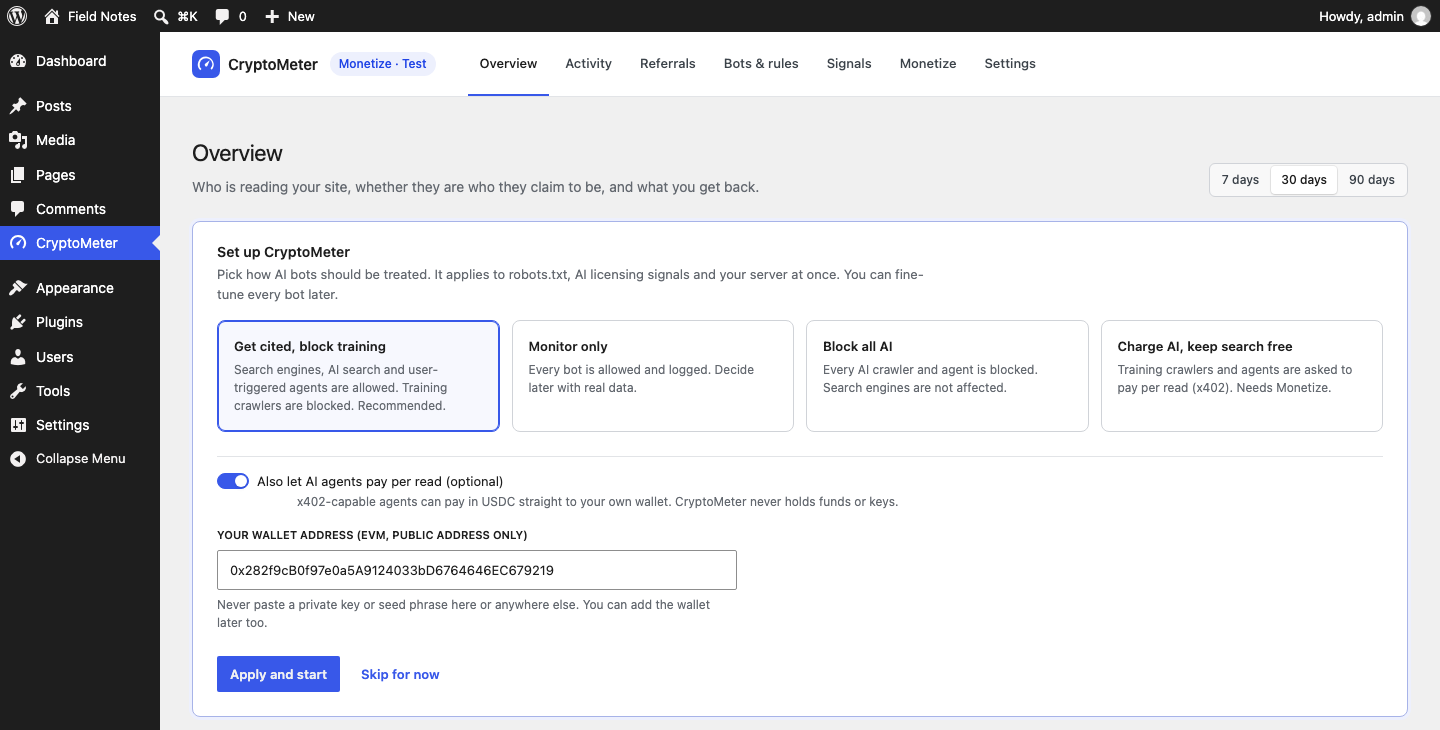
- Policy preset: choose one of the four presets below.
- Also let AI agents pay per read (optional): leave off for pure traffic control. If you switch it on, a field Your wallet address (EVM, public address only) appears. You can also add the wallet later under Monetize. Never paste a private key or seed phrase.
- Press Apply and start, or Skip for now (keeps the current settings and hides the card).
Presets
A preset sets the policy of each intent and, except for Monitor only, the published search / AI input / AI training preferences (robots.txt Content-Signal, Content-Usage, RSL, TDMRep), so the signals say the same thing the server does. Block all AI publishes ai-input=no, ai-train=no; the other presets publish ai-input=yes, ai-train=no. You can fine-tune everything later on Bots & rules and Signals.
| Preset | Search engines | AI search & answers | AI agents (user-triggered) | AI training | Exceptions |
|---|---|---|---|---|---|
| Get cited, block training (default) | Allow | Allow | Allow | Block | Bytespider: Block |
| Block all AI | Allow | Block | Block | Block | none |
| Monitor only | Allow | Allow | Allow | Allow | none |
| Charge training and agents (needs Monetize) | Allow | Allow | Charge | Charge | Bytespider: Block |
Applying a preset replaces the intent policies and removes per-bot exceptions. Rate limits and custom bots are kept. The Charge preset can only be chosen while Monetize is on.
6.Overview
CryptoMeter → Overview answers three questions: who is reading, is it real, and what comes back. All numbers come from your own database; there is no sample data.
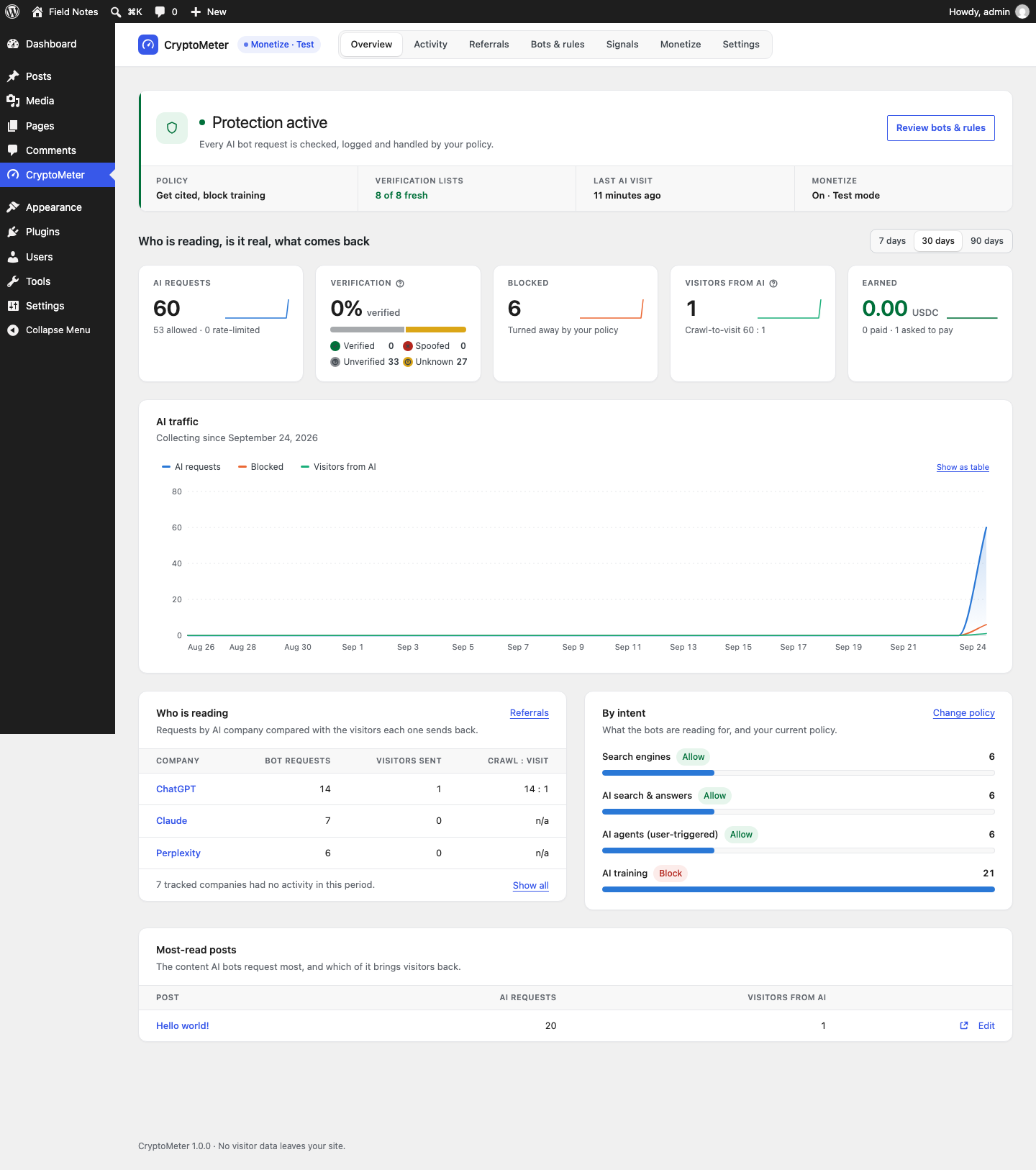
Status band
Protection active ("Every AI bot request is checked, logged and handled by your policy."), Protection paused (CryptoMeter is switched off under Settings → General) or Setup needed. Below it: the current Policy (preset name, or "Custom policy"), Verification lists (for example "8 of 8 fresh"), Last AI visit and Monetize (Off, On · Test mode, On · Live). If a page-cache plugin is detected, a warning links to Open server & cache rules.
Cards (7, 30 or 90 days, UTC days)
| Card | Exact meaning |
|---|---|
| AI requests | Every logged bot request except genuine search engines: AI crawlers and agents, generic HTTP clients (curl, python-requests and similar), and search-engine user agents that failed verification. Sub-line: allowed and rate-limited. |
| Verification | Share verified, with counts for Verified, Spoofed, Unverified and Unknown. |
| Blocked | Requests turned away by your policy (HTTP 403). |
| Visitors from AI | Referred visitors counted by the beacon, with the overall crawl-to-visit ratio. A minimum, see Referrals. |
| Earned (only with Monetize) | USDC from settled payments; "paid" and "asked to pay" counts. |
| Ignored robots.txt (without Monetize) | Requests for URLs your robots.txt disallows for that bot; sub-line: bytes served to bots. |
Chart and tables
- AI traffic: daily AI requests, blocked requests and visitors from AI, "Collecting since" the first logged request. Show as table shows the same data as a table.
- Who is reading: per AI company, Bot requests, Visitors sent and Crawl : visit. Inactive companies are hidden behind Show all.
- By intent: requests per intent with the current policy; Change policy opens Bots & rules.
- Most-read posts: the content AI bots request most, and which of it brings visitors back.
7.Activity
CryptoMeter → Activity lists every request from an AI bot or crawler. Human visitors and logged-in users are never logged, and IP addresses are shortened to their network prefix (IPv4 /24, IPv6 /48).
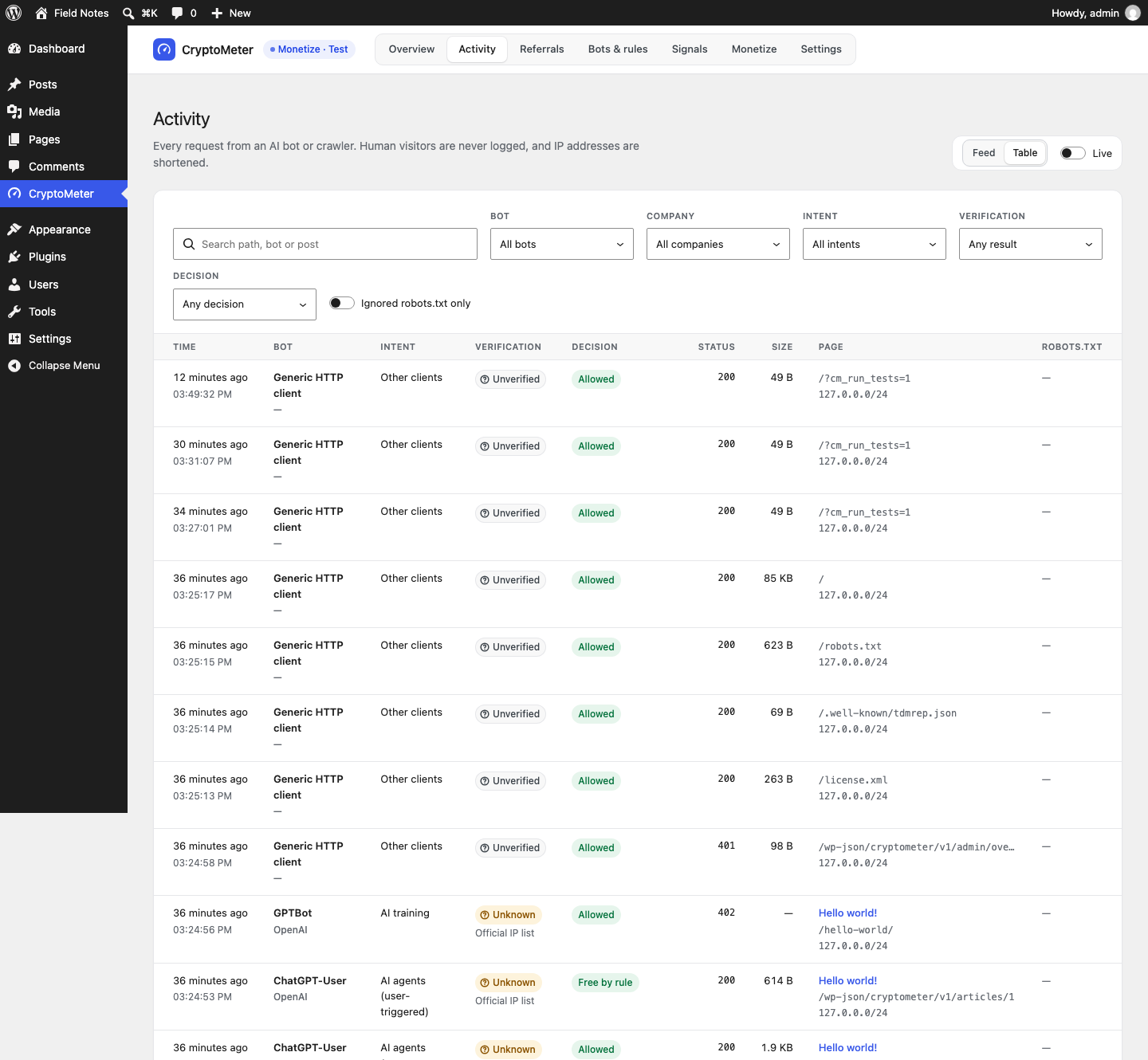
- View: Feed or Table. Live polls for new requests every 5 seconds ("Updating every 5 s"), paused while the browser tab is hidden.
- Filters: search (path, bot or post), Bot, Company, Intent, Verification, Decision, and Ignored robots.txt only. Clear all filters resets them.
- Columns: Time, Bot (and company), Intent, Verification (verdict and method), Decision, Status (HTTP code), Size (bytes sent), Page, robots.txt (Ignored or Respected).
Decisions
| Label | Meaning |
|---|---|
| Allowed | The bot read the page (policy Allow). |
| Blocked | HTTP 403 (policy Block, per-post block, or spoofed bot). |
| Rate-limited (429) | Over a per-bot limit, or (Monetize) the per-IP limit for unpaid requests. |
| Passed (search) | A search engine; passes untouched. |
| Free by rule | An access rule made the read free (allowlisted IP or user agent, excluded path or category, short post, daily free reads). |
| Asked to pay (402), Paid, Access pass, Payment failed, Not charged (no wallet) | Monetize only. See The HTTP 402 flow. |
The log keeps 90 days by default (Settings → General → Retention).
8.Referrals
CryptoMeter → Referrals shows visitors who arrive from AI assistants, compared with how much each company's bots read.
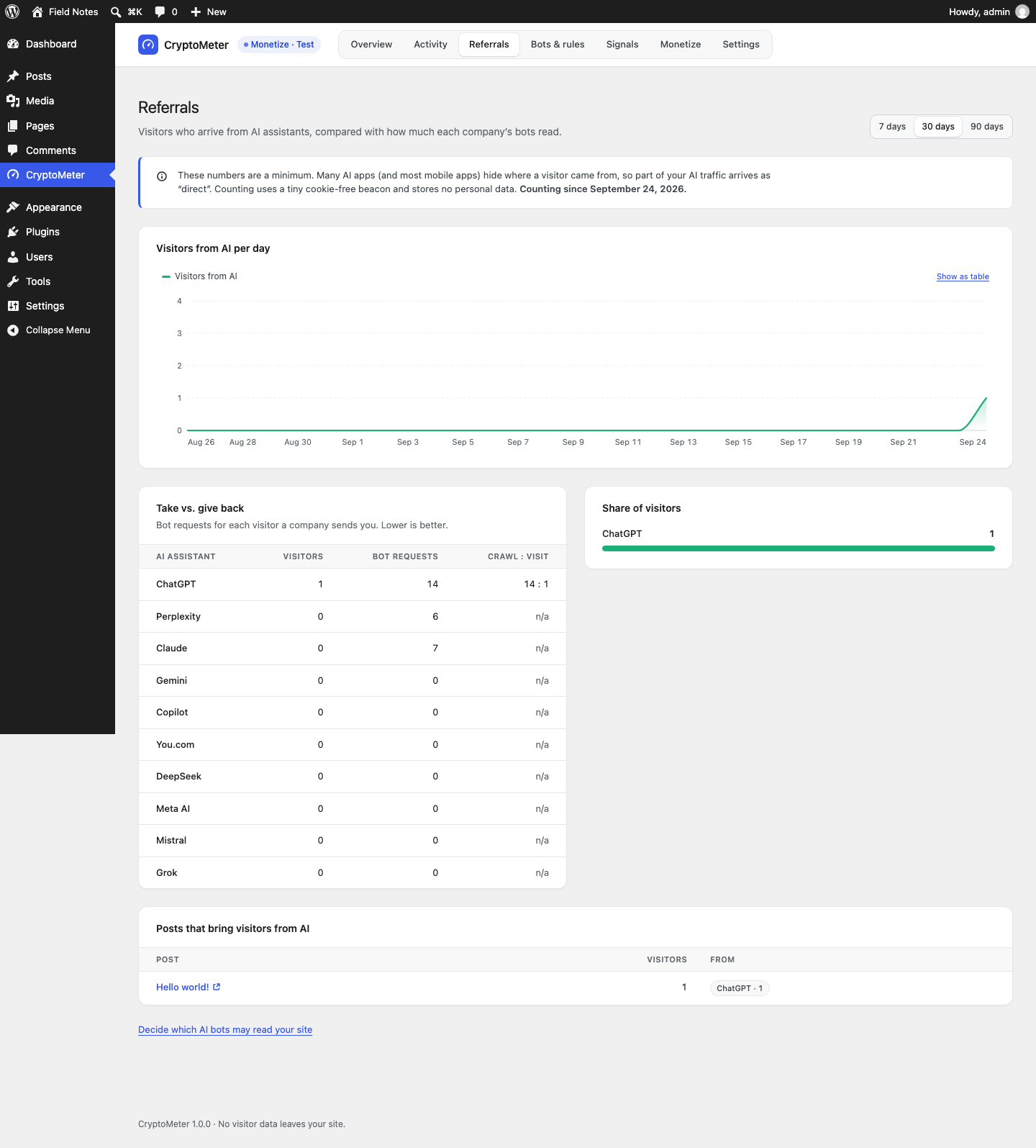
How visitors are counted
- A tiny inline script (under 1 KB) runs on the front end for visitors who are not logged in. It only sends something when the referrer host or the
utm_sourceparameter matches a known AI assistant. - It posts the page path, the assistant host and the
utm_sourcevalue to/wp-json/cryptometer/v1/beaconwithnavigator.sendBeacon. Because the visitor's browser sends it, it also works when the page itself came from a page cache. - No cookies, no IP address stored, no personal data. Only day × assistant × post counters are saved. A salted hash of the IP is kept for 2 minutes to limit one visitor to 30 beacons per minute.
- Switch it off under Settings → General → Count visitors from AI assistants.
Recognised assistants
| Assistant | Referrer host / utm_source | Compared with the bots of |
|---|---|---|
| ChatGPT | chatgpt.com, chat.openai.com | OpenAI (all OpenAI bots) |
| Perplexity | perplexity.ai | Perplexity |
| Claude | claude.ai | Anthropic |
| Gemini | gemini.google.com | Google's AI bots only (GoogleOther, Google-CloudVertexBot), not Googlebot |
| Copilot | copilot.microsoft.com | Microsoft (the only Microsoft bot in the list is Bingbot) |
| You.com | you.com | You.com (YouBot) |
| DeepSeek | chat.deepseek.com | no known crawler: ratio n/a |
| Meta AI | meta.ai | Meta |
| Mistral | chat.mistral.ai | Mistral |
| Grok | grok.com | no known crawler: ratio n/a |
Take vs. give back lists visitors, bot requests and Crawl : visit per assistant ("Lower is better"). The ratio shows n/a when there are no visitors yet or no known crawler. On low-traffic sites the ratio is noisy; look at the raw counts too.
9.Bots & rules
CryptoMeter → Bots & rules has three sections: Policies, Verification sources and Server & cache rules.
Policies
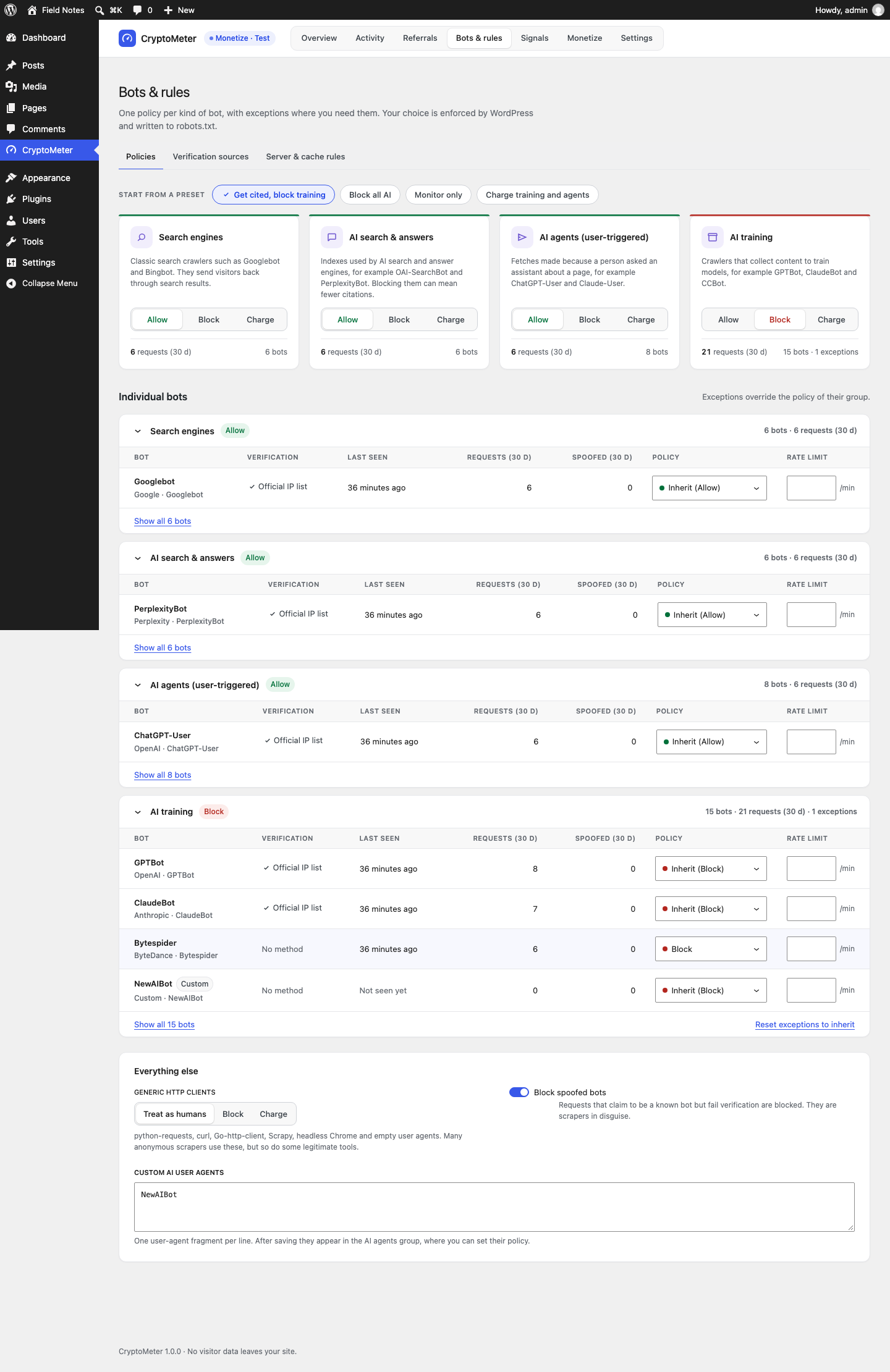
- Start from a preset: the four presets from section 5. A confirmation dialog explains what is replaced.
- Intent cards: one per intent (Search engines, AI search & answers, AI agents (user-triggered), AI training) with Allow / Block / Charge, requests in the last 30 days, number of bots and exceptions.
- Charge is locked until Monetize is on. A stored Charge policy acts as Allow while Monetize is off ("Charge acts as Allow until Monetize is on.").
- Blocking search engines shows "This removes your site from search results."
- Blocking AI search & answers can mean fewer citations in AI search tools.
- Individual bots: one table per intent with Verification method, Last seen, Requests (30 d), Spoofed (30 d), Policy (Inherit (…), Allow, Block, Charge) and Rate limit (requests per minute; empty or 0 = no limit). Reset exceptions to inherit removes the group's exceptions.
- Everything else:
- Generic HTTP clients: Treat as humans (default), Block or Charge. Covers python-requests, curl, Go-http-client, Scrapy, headless Chrome, empty user agents and similar libraries. Many anonymous scrapers use these, but so do some legitimate tools (uptime monitors, feed readers).
- Block spoofed bots (default on): requests that claim to be a known bot but fail verification are blocked.
- Custom AI user agents: one user-agent fragment per line (at least 3 characters). After saving they appear in the AI training group, where you can set their policy.
Press Save changes in the bar at the bottom. "Bot policies saved. robots.txt and signals are updated." confirms it.
Per-bot rate limits
A per-bot limit counts all requests of that bot per minute, across all its IP addresses. Above the limit the bot gets HTTP 429 with Retry-After: 60 and the text "Too many requests from this crawler. Slow down." It applies on every page, whatever the bot's policy. Verified on a test install: with a limit of 3, requests 4 and 5 in the same minute returned 429.
Command palette
Where WordPress provides its command palette (Ctrl/⌘ + K), the CryptoMeter page adds commands such as "CryptoMeter: Overview", "CryptoMeter: Bots & rules", "CryptoMeter: Settings" and "CryptoMeter: Block AI training bots".
Verification sources
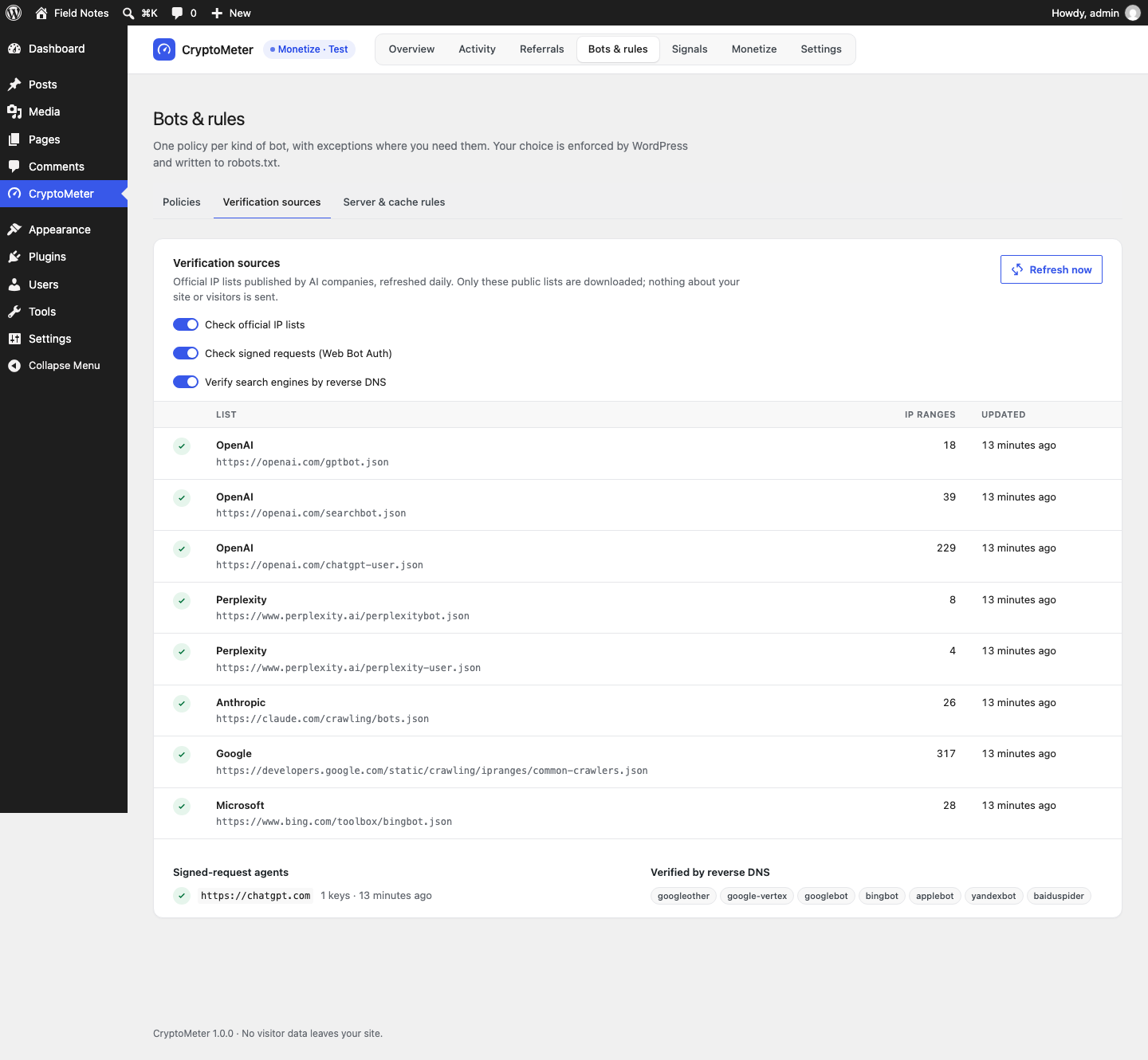
- Check official IP lists, Check signed requests (Web Bot Auth) and Verify search engines by reverse DNS switch each method on or off (all on by default).
- The table shows each list's vendor and URL, the number of IP ranges and when it was last updated. A red dot shows the fetch error; the last good copy is kept.
- Refresh now downloads all lists and the key directory immediately. Otherwise they refresh once a day by WP-Cron.
- Signed-request agents: origins whose Web Bot Auth keys are trusted (default
https://chatgpt.com), with key count and age. - Verified by reverse DNS: googleother, google-vertex, googlebot, bingbot, applebot, yandexbot, baiduspider.
How verdicts are decided is explained in section 14.
Server & cache rules
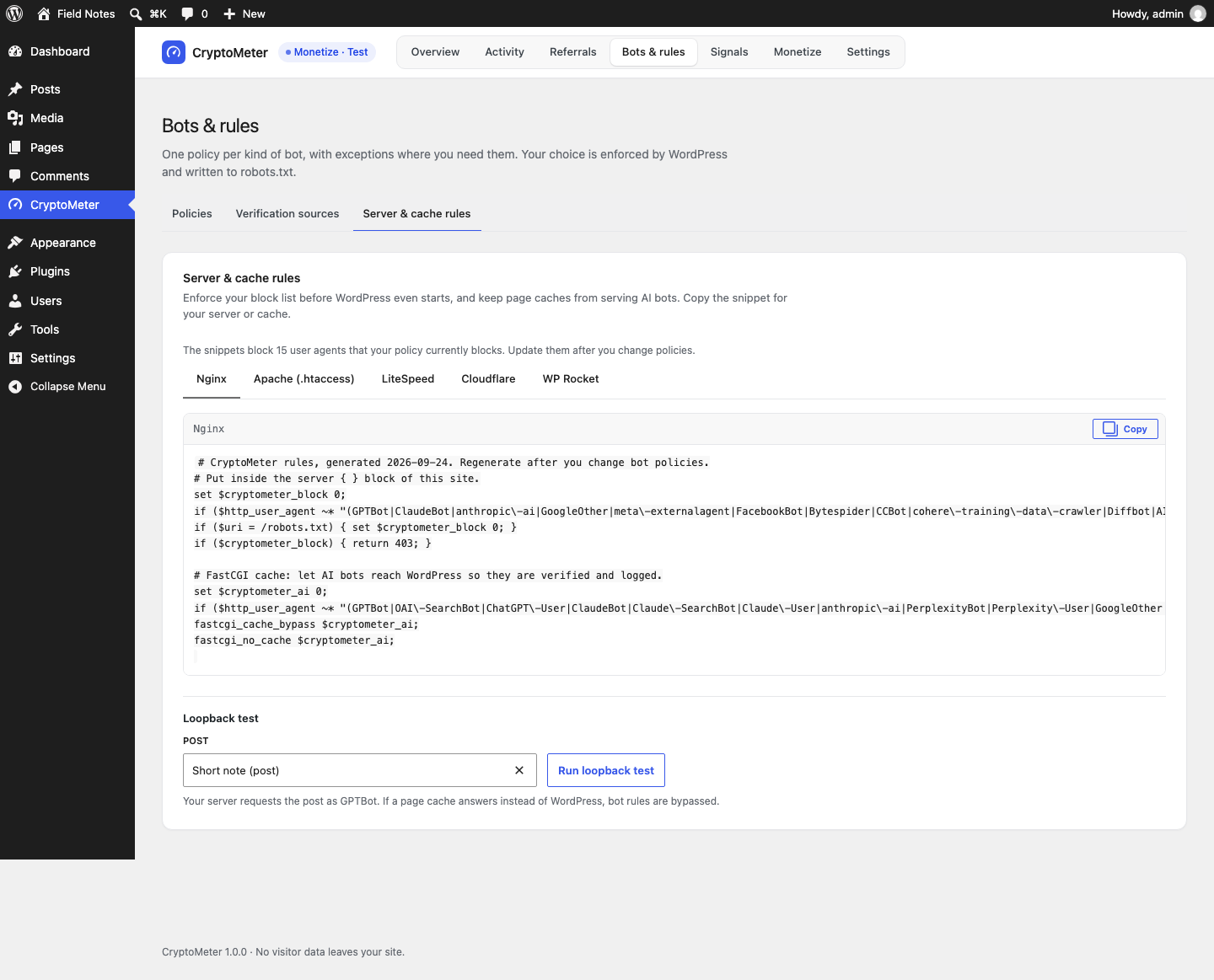
CryptoMeter's own blocking happens inside WordPress. Blocking at the web server or CDN saves PHP work, and excluding AI bots from page caches lets CryptoMeter see, verify and log them. The snippets are regenerated each time you open the tab ("Update them after you change policies").
| Tab | What it contains | Where it goes |
|---|---|---|
| Nginx | Returns 403 for blocked user agents (except /robots.txt) and sets fastcgi_cache_bypass / fastcgi_no_cache for all AI user agents. | Inside the server { } block of the site; then reload Nginx. |
| Apache (.htaccess) | mod_rewrite rule answering 403 ([F]) for blocked user agents, except /robots.txt. | .htaccess, above # BEGIN WordPress. |
| LiteSpeed | The Apache rule plus a LiteSpeed Cache no-cache rule for AI user agents. | .htaccess, above # BEGIN WordPress. |
| Cloudflare | A WAF custom rule expression matching blocked user agents, excluding /robots.txt. | Cloudflare dashboard → Security → WAF → Custom rules: paste as the expression, action Block. |
| WP Rocket | All AI user-agent fragments, one per line. | WP Rocket → Advanced Rules → "Never Cache User Agent(s)". |
Test before and after. A mistake in server configuration can take a site down. Keep a backup of the file you edit, and test with the curl commands from the Quick start. Server-level rules block by user agent only (no verification), and requests stopped there never reach WordPress, so they do not appear in Activity. The snippets were generated and read on a test install; MIKODES has not run them on a live Nginx, Apache, LiteSpeed or Cloudflare setup.
The Loopback test at the bottom is explained in Simulator and loopback test and Page caches.
Built-in bot list
A bot is recognised when its match fragment appears in the request's User-Agent (case-insensitive). ChatGPT agent uses a normal Chrome user agent and is recognised only by its Web Bot Auth signature. Listing a company here only means CryptoMeter recognises its crawler; it says nothing about whether it pays through x402.
| Bot | Company | Intent | Match | Verification |
|---|---|---|---|---|
| GPTBot | OpenAI | AI training | GPTBot | Official IP list |
| OAI-SearchBot | OpenAI | AI search & answers | OAI-SearchBot | Official IP list |
| ChatGPT-User | OpenAI | AI agents | ChatGPT-User | Official IP list, signature |
| ChatGPT agent | OpenAI | AI agents | (signature only) | Signed request |
| ClaudeBot | Anthropic | AI training | ClaudeBot | Official IP list |
| Claude-SearchBot | Anthropic | AI search & answers | Claude-SearchBot | Official IP list |
| Claude-User | Anthropic | AI agents | Claude-User | Official IP list |
| anthropic-ai | Anthropic | AI training | anthropic-ai | Official IP list |
| PerplexityBot | Perplexity | AI search & answers | PerplexityBot | Official IP list |
| Perplexity-User | Perplexity | AI agents | Perplexity-User | Official IP list |
| GoogleOther | AI training | GoogleOther | Official IP list, reverse DNS | |
| Google-CloudVertexBot | AI agents | Google-CloudVertexBot | Official IP list, reverse DNS | |
| Meta-ExternalAgent | Meta | AI training | meta-externalagent | No method |
| Meta-ExternalFetcher | Meta | AI agents | meta-externalfetcher | No method |
| FacebookBot | Meta | AI training | FacebookBot | No method |
| Amazonbot | Amazon | AI search & answers | Amazonbot | No method |
| Bytespider | ByteDance | AI training | Bytespider | No method |
| CCBot | Common Crawl | AI training | CCBot | No method |
| cohere-ai | Cohere | AI agents | cohere-ai | No method |
| cohere-training-data-crawler | Cohere | AI training | cohere-training-data-crawler | No method |
| MistralAI-User | Mistral | AI agents | MistralAI-User | No method |
| DuckAssistBot | DuckDuckGo | AI search & answers | DuckAssistBot | No method |
| YouBot | You.com | AI search & answers | YouBot | No method |
| Diffbot | Diffbot | AI training | Diffbot | No method |
| AI2Bot | Allen Institute | AI training | AI2Bot | No method |
| Timpibot | Timpi | AI training | Timpibot | No method |
| omgili | Webz.io | AI training | omgili | No method |
| ImagesiftBot | Hive | AI training | ImagesiftBot | No method |
| Googlebot | Search engines | Googlebot | Official IP list, reverse DNS | |
| Bingbot | Microsoft | Search engines | bingbot | Official IP list, reverse DNS |
| Applebot | Apple | Search engines | Applebot | Reverse DNS |
| DuckDuckBot | DuckDuckGo | Search engines | DuckDuckBot | No method |
| YandexBot | Yandex | Search engines | YandexBot | Reverse DNS |
| Baiduspider | Baidu | Search engines | Baiduspider | Reverse DNS |
That is 28 AI crawlers and agents and 6 search engines, plus your custom user agents. A request that carries an x402 payment or access-pass header but matches no known bot is recorded as "x402 client".
10.Signals
CryptoMeter → Signals ("Signals & licensing") tells AI companies, in their own formats, what they may do with your content. As the screen says: signals are requests, not locks; Bots & rules is what enforces them.
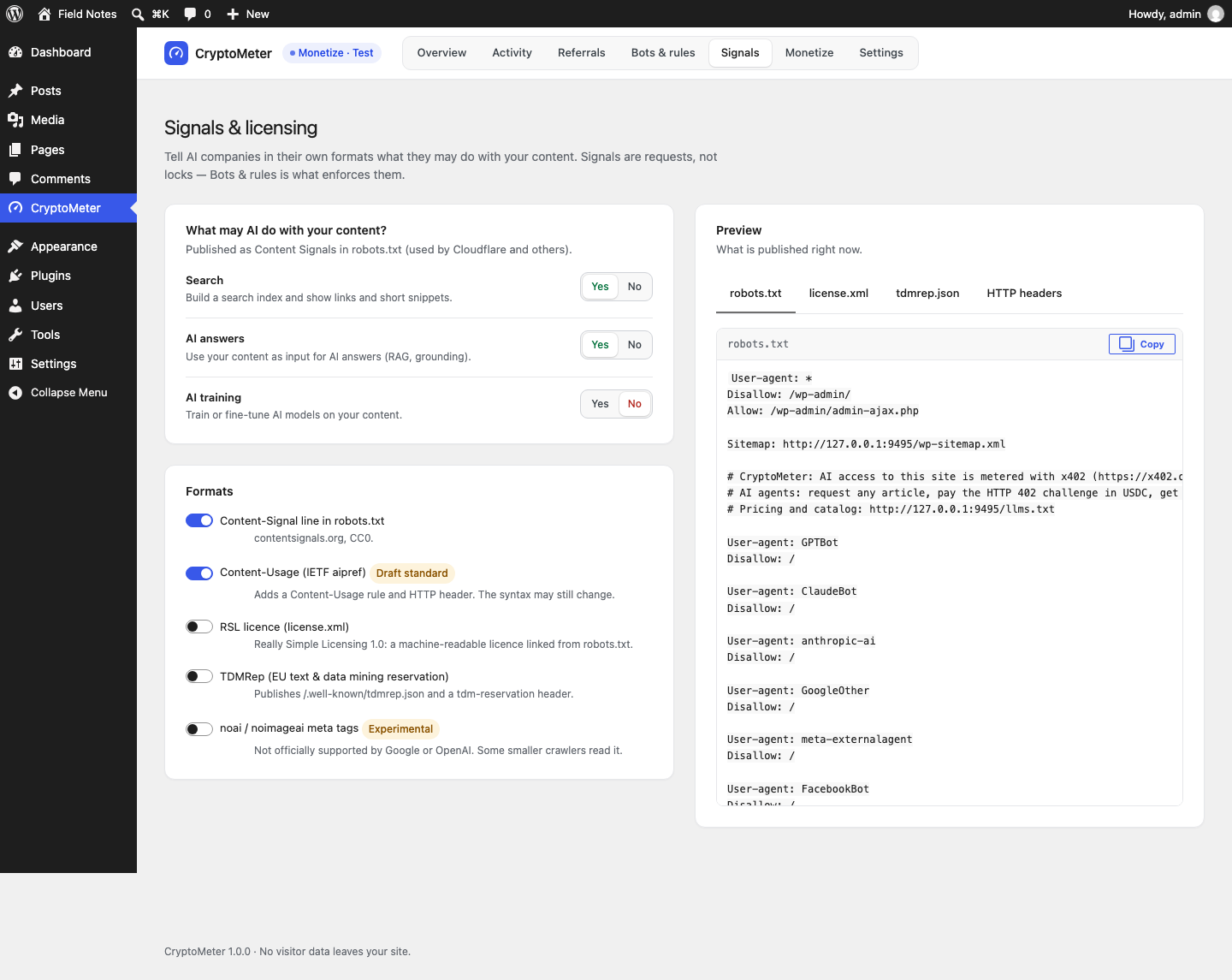
What may AI do with your content?
| Choice | Meaning | Default |
|---|---|---|
| Search | Build a search index and show links and short snippets. | Yes |
| AI answers | Use your content as input for AI answers (RAG, grounding). | Yes |
| AI training | Train or fine-tune AI models on your content. | No |
Formats
| Toggle | What is published | Default |
|---|---|---|
| Content-Signal line in robots.txt | A User-agent: * group in the virtual robots.txt with Content-Signal: search=yes, ai-input=yes, ai-train=no (contentsignals.org, CC0). | On |
| Content-Usage (IETF aipref) Draft standard | Content-Usage: train-ai=n, ai-use=y, search=y in the same robots.txt group and as an HTTP response header on front-end pages. The IETF syntax is a draft and may still change. | On |
| RSL licence (license.xml) | An RSL 1.0 document at /license.xml, a License: line at the top of robots.txt and a Link: <…/license.xml>; rel="license"; type="application/rsl+xml" header. Extra fields: Licence terms and Licensing contact (e-mail or URL, optional). | Off |
| TDMRep (EU text & data mining reservation) | /.well-known/tdmrep.json, a tdm-reservation: 1 header and meta tag, and optionally a TDM policy URL (tdm-policy). | Off |
| noai / noimageai meta tags Experimental | <meta name="robots" content="noai, noimageai"> and an X-Robots-Tag: noai, noimageai header. Not officially supported by Google or OpenAI; some smaller crawlers read it. | Off |
RSL licence terms
- Search and AI answers allowed, AI training prohibited (default)
- All AI use prohibited (search indexing allowed)
- Follow the search / AI answers / AI training choices above
- Free reuse with attribution and a link
- AI use needs a licence: contact me
- Pay per crawl with x402 (Monetize): only offered while Monetize is on; if Monetize is off or not set up, the default terms are published instead.
Output verified on a test install with RSL on and a contact address:
<?xml version="1.0" encoding="UTF-8"?>
<rsl xmlns="https://rslstandard.org/rsl">
  <content url="/">
    <license>
      <prohibits type="usage">ai-train</prohibits>
      <legal type="contact">mailto:licensing@example.com</legal>
    </license>
  </content>
</rsl>
The Preview (tabs robots.txt, license.xml, tdmrep.json, HTTP headers) updates as you change options ("Unsaved — this is what will be published after you save."). Press Save changes; "Signals saved and published." confirms it.
Physical robots.txt. If a real robots.txt file exists in your web root, the web server serves it and WordPress's virtual robots.txt (with CryptoMeter's lines) is never used. The preview then shows your physical file. Either delete the file or copy the lines into it by hand.
robots.txt, /license.xml and /.well-known/tdmrep.json stay readable for every bot, including blocked ones. Signal lines, headers and files are only published while CryptoMeter is switched on (Settings → General).
11.Monetize (optional)
CryptoMeter → Monetize: "Optional: let x402-capable AI agents pay per article in USDC, straight to your own wallet. Few agents pay today — treat it as an extra, not a revenue plan." Everything else in CryptoMeter works without it.
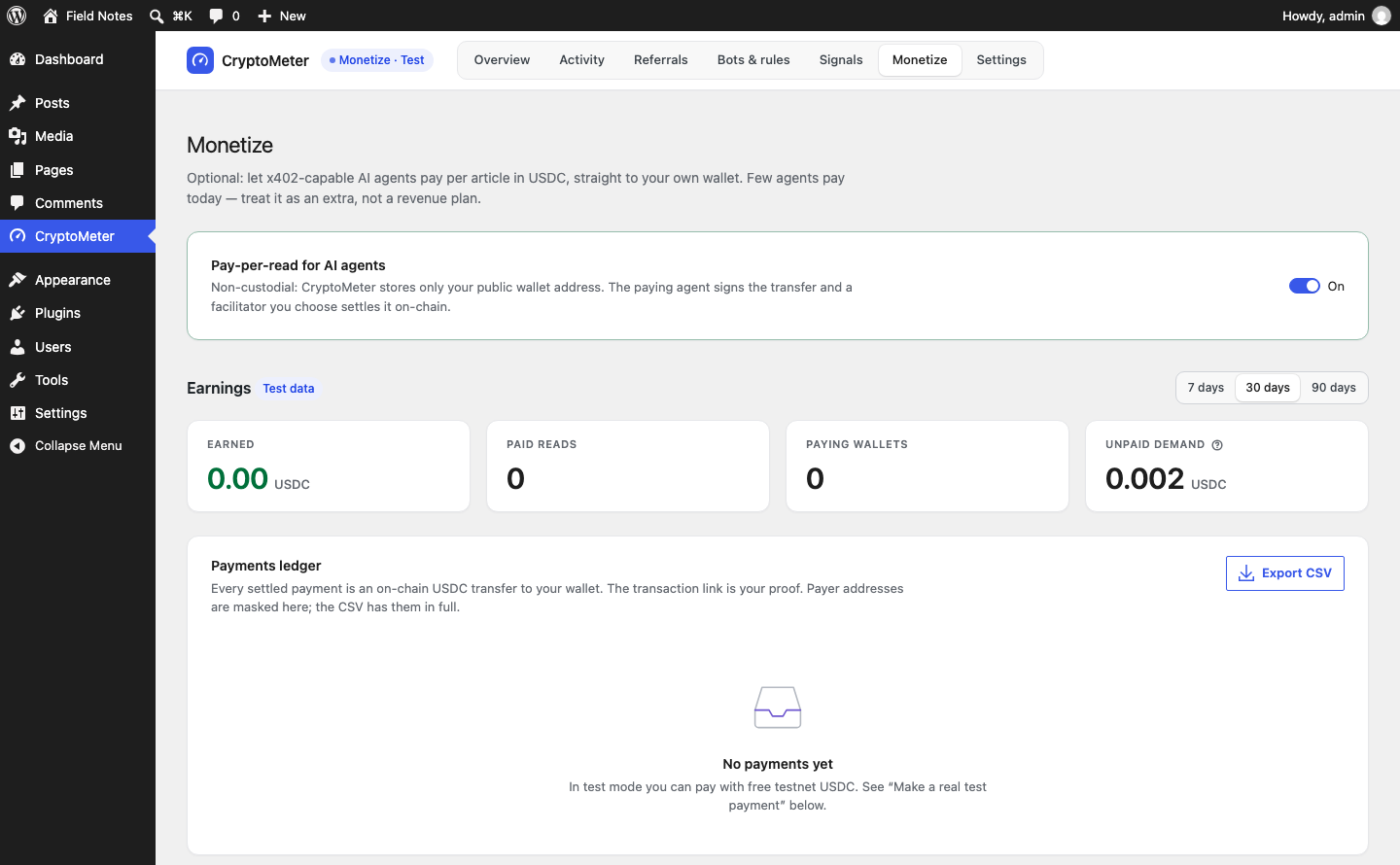
Turning it on
- Switch Pay-per-read for AI agents on.
- Enter your wallet under Payments and save. Until a valid wallet is saved, bots set to Charge are let through and counted as unpaid demand.
- Choose which bots pay: on Bots & rules set an intent or a bot to Charge, or apply the preset Charge training and agents.
- Stay in Test mode and use the Simulator first.
Non-custodial. CryptoMeter stores only your public wallet address. The paying agent signs the transfer and a facilitator you choose settles it on-chain. CryptoMeter never asks for a private key or seed phrase; anyone asking you for one "to set up CryptoMeter" is a scammer.
Switching Monetize off makes Charge behave like Allow again (logged as "Allowed"). Your wallet, prices and ledger are kept.
Payments
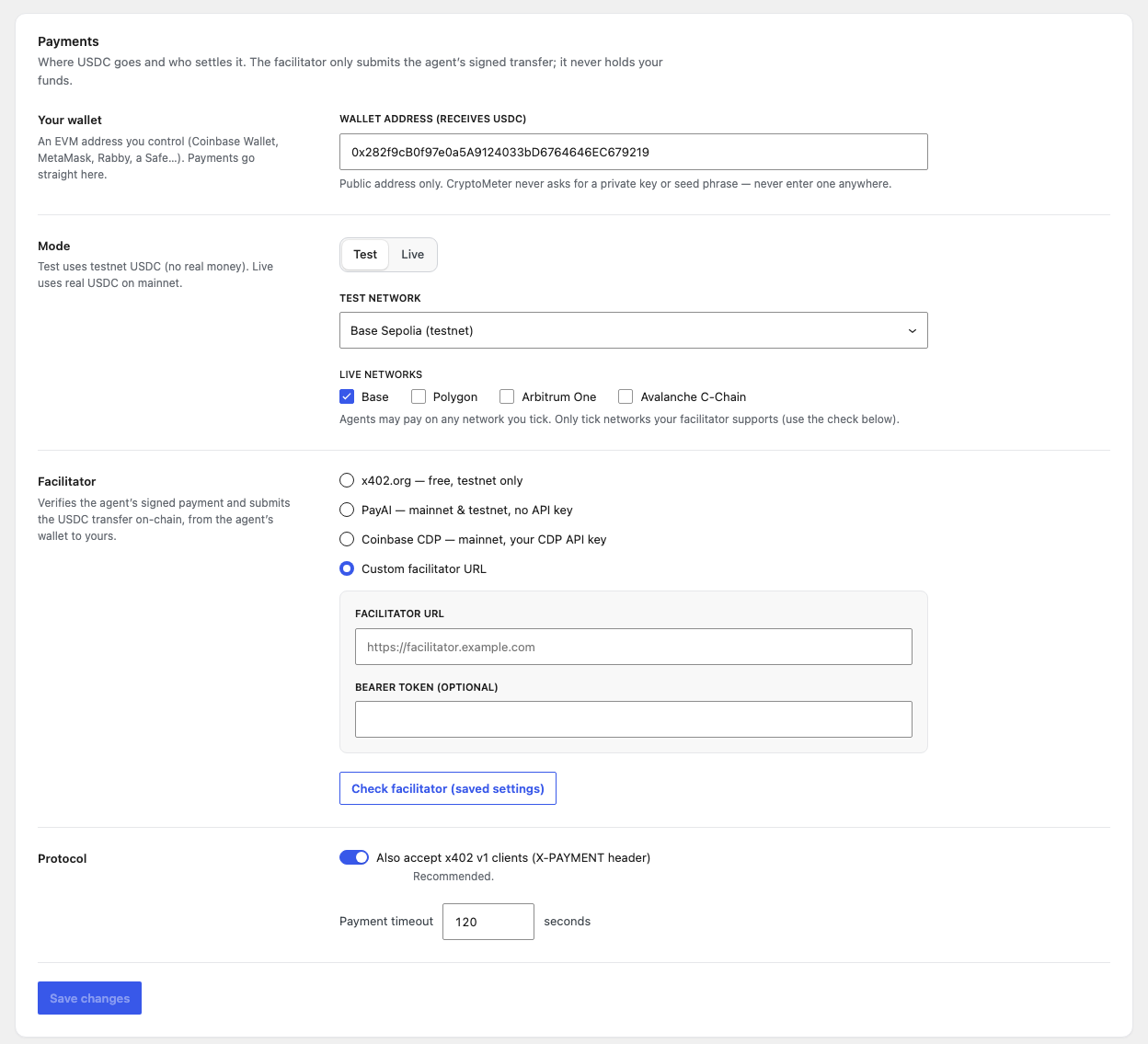
| Field | What it does | Default |
|---|---|---|
| Wallet address (receives USDC) pay_to | Your public EVM address (0x + 40 hex characters). Payments go straight here. An invalid address is not saved. | empty |
| Mode mode | Test: testnet USDC, no real money. Live: real USDC on mainnet. Payments and traffic counters are recorded per mode. | Test |
| Test network network_test | Base Sepolia, Polygon Amoy, Arbitrum Sepolia or Avalanche Fuji. | Base Sepolia |
| Live networks networks_live | Base, Polygon, Arbitrum One, Avalanche C-Chain. Agents may pay on any network you tick. Only tick networks your facilitator supports. If none is ticked, Base is used. | Base |
| Facilitator facilitator | x402.org — free, testnet only · PayAI — mainnet & testnet, no API key · Coinbase CDP — mainnet, your CDP API key · Custom facilitator URL. Choosing Live with x402.org switches to PayAI automatically, with a notice. | x402.org |
| Facilitator URL, Bearer token (optional) | Custom only. The URL must be https:// (plain http only for localhost, 127.0.0.1, ::1). The token is sent as Authorization: Bearer … and never shown again ("Saved — type to replace"). | empty |
| CDP API key ID, CDP API key secret | Coinbase CDP only. Replaced by "CDP credentials are defined in wp-config.php." when the constants are set. | empty |
| Check facilitator (saved settings) | Tests the saved settings (save first). Shows "Facilitator reachable" / "Facilitator not reachable", "API key accepted" / "API key rejected" (CDP), "This facilitator is testnet-only. Choose another one for live mode.", and per network: supported, not supported by this facilitator, or unknown. | - |
| Also accept x402 v1 clients (X-PAYMENT header) legacy_v1 | Accept the older v1 header and send a v1-shaped body next to the v2 header. Recommended. | On |
| Payment timeout max_timeout | Seconds a signed payment may take (sent as maxTimeoutSeconds). 30-600. | 120 |
Pricing and per-post prices
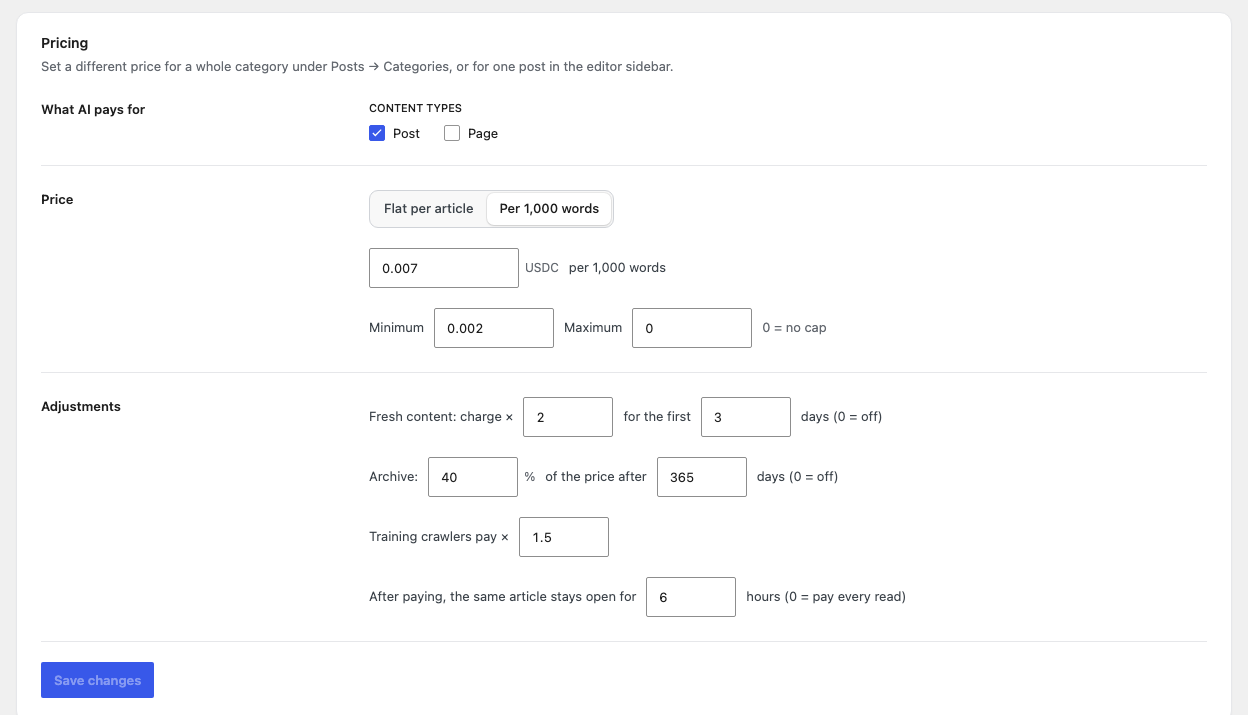
| Field | What it does | Default |
|---|---|---|
| Content types post_types | Which public post types are metered (published, not password-protected). This also decides where the editor box, the per-post "Blocked" option and the core REST API guard apply. | Post |
| Flat per article / Per 1,000 words | Pricing model. | Flat |
| Price per article / Price per 1,000 words | USDC, 0-100. | 0.01 / 0.005 |
| Minimum, Maximum | Computed prices are raised to the minimum or capped at the maximum (0 = no cap). Per-post custom prices are not clamped. | 0.001 / 1.00 |
| Fresh content: charge × … for the first … days | Premium for new posts. 0 days = off. | × 2, off |
| Archive: … % of the price after … days | Discount for old posts. 0 days = off. Skipped when the post is fresh. | 50 %, off |
| Training crawlers pay × | Extra multiplier for AI training bots. | × 1 |
| After paying, the same article stays open for … hours | Access window (0 = pay every read, max 8760). | 24 |
Price calculation order
- Per-post setting (editor): Read for free → 0; Blocked → 403; custom price → used as-is.
- Category price: the highest CryptoMeter price among the post's categories.
- Otherwise the site model (flat, or words ÷ 1,000 × price per 1,000 words).
- Fresh premium or archive price (only one).
- Training multiplier for AI training bots.
- Minimum / maximum.
- The
cryptometer_pricefilter has the final say.
Per post and per category
- Editor box "CryptoMeter · AI access" (sidebar of metered post types), "AI bots reading this post": Pay site price (default), Pay a custom price (Price per read (USDC)), Read for free, Blocked. Blocked works with or without Monetize: AI bots get HTTP 403 for that post; humans and search engines are unaffected. The box shows the current price and, once there are payments, "Earned $X from N paid AI reads".
- Posts list: an "AI price" column (a price, Free or Blocked).
- Posts → Categories: field AI price per read (USDC) overrides the site price for posts in that category. Only the standard Categories taxonomy has it.
The HTTP 402 flow
For developers and the curious. You do not need this to use the plugin.
- Challenge. A bot set to Charge requests a metered post and gets HTTP 402 Payment Required with a
PAYMENT-REQUIREDheader (x402 v2, base64 JSON: resource plus oneacceptsentry per active network withscheme: "exact", CAIP-2 network, amount in atomic units, USDC contract,payTo,maxTimeoutSeconds, token name/version), a JSON body (v1 shape when v1 is accepted) with acryptometerobject (title, teaser, price, networks, message), andLink: </llms.txt>; rel="describedby". Verified on a test install: GPTBot with the Charge preset got 402,x-cryptometer: challenge, amount10000(0.01 USDC) onbase-sepolia. - Pay. The agent signs a USDC
TransferWithAuthorization(EIP-3009) for exactly that amount to your address and retries withPAYMENT-SIGNATURE(v2) orX-PAYMENT(v1). - Check and settle. CryptoMeter checks locally (decoding, version, network, exact amount, token, recipient, validity window, unused nonce), throttles failed attempts (10 per IP per minute), calls the facilitator's
/verify, reserves the nonce (replay protection) and calls/settle(one retry on "pending"). - Deliver. HTTP 200 with
PAYMENT-RESPONSE(v1:X-PAYMENT-RESPONSE) and the article as HTML, Markdown or JSON (see What paying agents receive). With an access window:X-CryptoMeter-Access(access pass) andX-CryptoMeter-Access-Expires.
Every non-search response CryptoMeter changes carries Cache-Control: no-store, private, max-age=0, Vary: User-Agent, Accept, PAYMENT-SIGNATURE, X-PAYMENT, the X-CryptoMeter decision header and the DONOTCACHEPAGE constant.
The access pass is a bearer token. Whoever holds it can re-open that one article until it expires. Set the access window to 0 to charge every read. To invalidate all passes: wp option delete cryptometer_secret (a new secret is created automatically).
Back doors. With Monetize set up and "Show bots set to Charge only excerpts in RSS feeds and the REST API" on, charged bots see excerpts only in feeds, archive/home/search pages and /wp-json/wp/v2/… for metered post types.
Networks and facilitators
| Network | CAIP-2 id | v1 name | USDC contract |
|---|---|---|---|
| Base | eip155:8453 | base | 0x833589fCD6eDb6E08f4c7C32D4f71b54bdA02913 |
| Base Sepolia (testnet) | eip155:84532 | base-sepolia | 0x036CbD53842c5426634e7929541eC2318f3dCF7e |
| Polygon | eip155:137 | polygon | 0x3c499c542cEF5E3811e1192ce70d8cC03d5c3359 |
| Polygon Amoy (testnet) | eip155:80002 | polygon-amoy | 0x41E94Eb019C0762f9Bfcf9Fb1E58725BfB0e7582 |
| Arbitrum One | eip155:42161 | (none) | 0xaf88d065e77c8cC2239327C5EDb3A432268e5831 |
| Arbitrum Sepolia (testnet) | eip155:421614 | (none) | 0x75faf114eafb1BDbe2F0316DF893fd58CE46AA4d |
| Avalanche C-Chain | eip155:43114 | avalanche | 0xB97EF9Ef8734C71904D8002F8b6Bc66Dd9c48a6E |
| Avalanche Fuji (testnet) | eip155:43113 | avalanche-fuji | 0x5425890298aed601595a70AB815c96711a31Bc65 |
| Facilitator | URL | Mode | Key |
|---|---|---|---|
| x402.org | https://x402.org/facilitator | Test only | none |
| PayAI | https://facilitator.payai.network | Test and live | none |
| Coinbase CDP | https://api.cdp.coinbase.com/platform/v2/x402 | Live | your CDP key |
| Custom | your URL (/verify, /settle, /supported under it) | Test and live | optional bearer token |
Facilitators are independent third parties with their own terms, availability and possible fees. CryptoMeter does not operate one and takes no fee. Trust your facilitator: CryptoMeter checks amount, recipient, network, expiry and replay itself, but relies on the facilitator for signature validity and settlement.
Coinbase CDP key in wp-config.php (recommended)
// Ed25519 key (one line)
define( 'CRYPTOMETER_CDP_KEY_ID', 'your-cdp-key-id' );
define( 'CRYPTOMETER_CDP_KEY_SECRET', 'your-base64-ed25519-secret' );

// or an EC (PEM) key: keep the line breaks as \n inside double quotes
define( 'CRYPTOMETER_CDP_KEY_SECRET', "-----BEGIN EC PRIVATE KEY-----\nLINE1\nLINE2\n-----END EC PRIVATE KEY-----\n" );
Create the key at portal.cdp.coinbase.com. Ed25519 needs the PHP sodium extension; PEM (ES256) needs openssl. A CDP API key lets your site call the facilitator; it cannot move funds from your receiving wallet. Keep it secret anyway.
Test payment and demo client
The Monetize card Make a real test payment summarises this. tools/pay-demo.mjs is a small Node.js x402 client; WordPress never loads it.
Use a throwaway testnet wallet only. The demo needs a private key to sign. Never use the key of a wallet that holds real funds, and never your receiving wallet's key. CryptoMeter itself never needs a private key.
- On a staging copy: Monetize on, Test mode, Base Sepolia, x402.org, your receiving wallet saved, and the test bot set to Charge (the Simulator must show 402 for GPTBot). Do not send a login cookie: logged-in users are never charged.
- Install Node.js (a current LTS; the demo was verified with Node.js 22). Copy the plugin's
toolsfolder to your computer and runnpm installinside it (installs viem). - Dry run with a random, empty wallet:
node pay-demo.mjs https://staging.example.com/some-post/. Expected: a 402, then a retry answered with the facilitator errorinvalid_exact_evm_insufficient_balance(the random wallet has no USDC). That proves the chain works. - Create a throwaway wallet (inside
tools):node --input-type=module -e "import { generatePrivateKey, privateKeyToAccount } from 'viem/accounts'; const k = generatePrivateKey(); console.log('PRIVATE_KEY=' + k); console.log('ADDRESS=' + privateKeyToAccount(k).address);" - Get free testnet USDC for that address at faucet.circle.com (USDC, Base Sepolia).
- Pay:
PRIVATE_KEY=0xYOUR_THROWAWAY_TESTNET_KEY node pay-demo.mjs https://staging.example.com/some-post/. On success it prints← 200 OK, the decoded PAYMENT-RESPONSE, the access-pass expiry and the start of the article in Markdown; the payment appears in the ledger.
| Variable | Purpose | Default |
|---|---|---|
PRIVATE_KEY | Throwaway testnet key. Without it a random empty wallet is used. | random |
UA | User agent sent to your site. | Mozilla/5.0 (compatible; GPTBot/1.2; x402-demo) |
ACCEPT | Accept header (Markdown / JSON / HTML). | text/markdown |
COOKIE | Optional Cookie header (for example a staging password page). Not a WordPress login cookie. | none |
Status. MIKODES verified the unfunded dry run against the real x402.org facilitator and the full success path against a mock facilitator (2026-09-23). A settlement with funded testnet USDC has not been recorded, so step 6 describes what the client prints according to its code.
Earnings and ledger
- Earned (settled payments only), Paid reads, Paying wallets, Unpaid demand ("Value of AI requests that were asked to pay and did not. Not money you are owed — just demand."), for 7/30/90 days, labelled Test data or Live data according to the current mode.
- Payments ledger: When, Post, Bot, Payer (masked), Network, Amount, Status (Settled, Pending, Processing, Unconfirmed, Failed), Transaction (explorer link).
- Export CSV downloads all payments of the current mode as
cryptometer-<mode>-<date>.csvwith full payer addresses (columnscreated_at_utc, post_id, url, bot, payer, network, asset, amount_atomic, amount_usdc, status, tx_hash, x402_version, facilitator). Cells starting with= + - @are prefixed with an apostrophe. - Recent facilitator errors appears when verify/settle calls failed. A few failures are normal (agents without funds).
Only Settled payments count as earned. Unconfirmed means the facilitator returned a transaction hash but still reported pending after one retry; no content was served; check the explorer. Rows stuck in Processing for over an hour are marked failed by the daily task. Tax treatment of crypto income depends on your country; ask a professional.
Simulator and loopback test
See your site through an AI bot's eyes (Monetize screen): choose a post and a visitor (GPTBot, ClaudeBot, PerplexityBot, ChatGPT-User, Googlebot, Human visitor or any bot under "All bots") and press Simulate request. You see the verdict (for example "403 GPTBot → Blocked with HTTP 403", or a 402 with the price), the Price breakdown, a ready curl command (Try it from a terminal), the Decoded PAYMENT-REQUIRED header and the Response body the bot receives. The simulation uses a made-up request: no facilitator call, no statistics, your IP is ignored and the rate limit is skipped.
Loopback test (Monetize screen and Bots & rules → Server & cache rules): Run loopback test makes your server request the post's normal URL with a GPTBot user agent and reports the status and the X-CryptoMeter header.
- "WordPress answered the bot directly. The page cache is not in the way." — good.
- "The bot got a 200 without passing through CryptoMeter. A page cache is probably serving AI bots." — see Page caches.
Avoid false warnings. Run it on a published item of a metered content type (Posts by default), with CryptoMeter switched on. With the default preset GPTBot is blocked, so a working setup answers 403 with X-CryptoMeter: block. If GPTBot is allowed and you test a Page that is not a metered content type, WordPress sends no X-CryptoMeter header and the test wrongly suspects a cache. Some hosts block a server from requesting itself; then the test shows an error.
12.Settings
CryptoMeter → Settings has five tabs. Each card saves on its own with Save changes. The grey key names are the internal names in the settings export file (option cryptometer_settings).
General
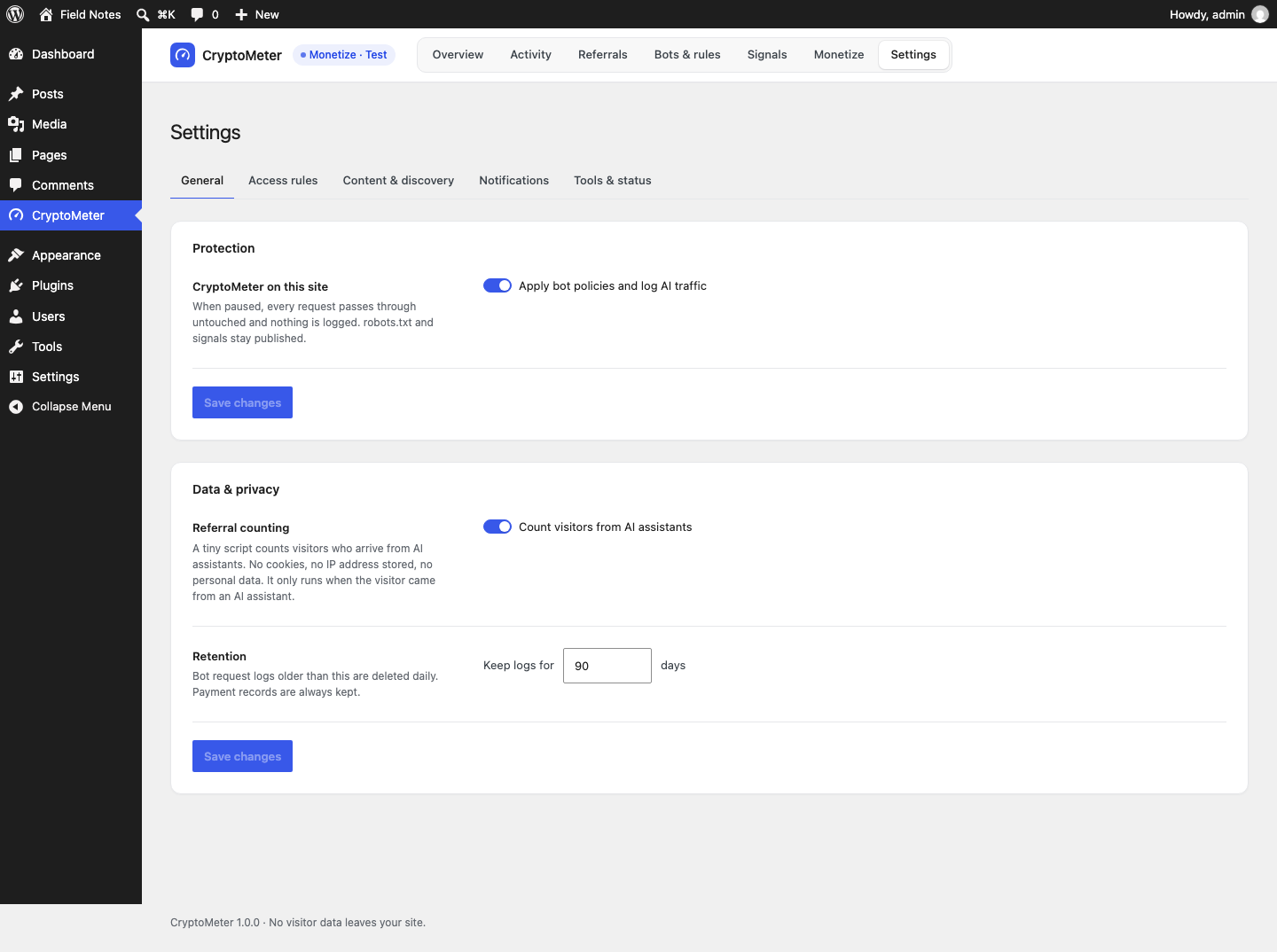
| Field | What it does | Default |
|---|---|---|
| Apply bot policies and log AI traffic enabled | Master switch ("CryptoMeter on this site"). When off, every request passes through untouched, nothing is logged, and the admin header shows Paused. Note: the robots.txt lines, signal headers, /license.xml and /tdmrep.json are also only published while this is on. /llms.txt is not affected. | On |
| Count visitors from AI assistants referral_tracking | The referral beacon (see Referrals). | On |
| Keep logs for … days log_retention_days | Bot log rows older than this are deleted daily. The small daily counters (traffic and referrals) keep at least 365 days. Payment records are always kept. 7-3650. | 90 |
Access rules
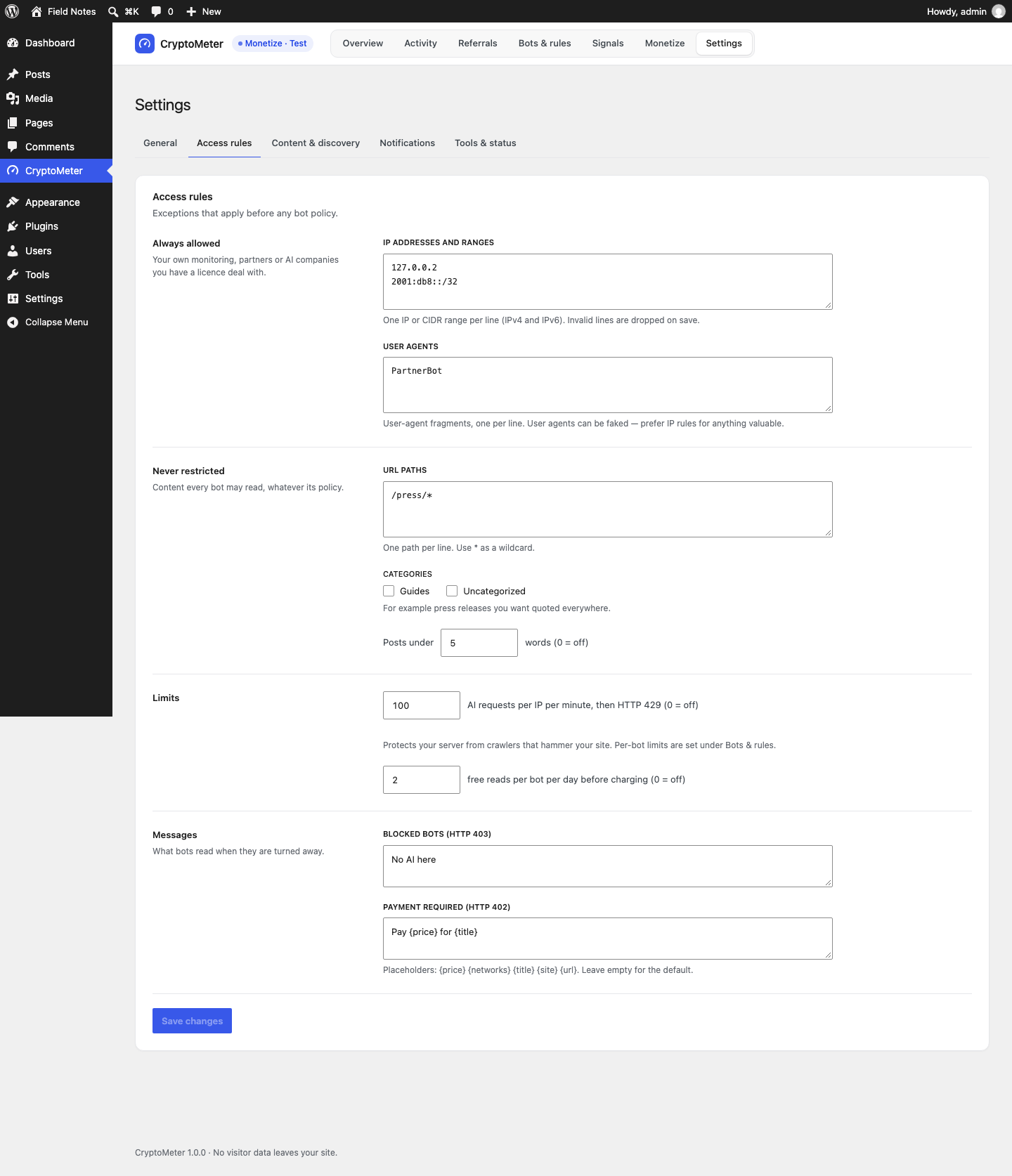
The screen describes these as "Exceptions that apply before any bot policy." In practice a Block policy still wins (an allowlisted IP using a blocked bot's user agent is still blocked); the rules make reads free for bots that would otherwise be charged.
| Field | What it does | Default |
|---|---|---|
| IP addresses and ranges allow_ips | One IP or CIDR per line (IPv4 and IPv6). Invalid lines are dropped on save. | empty |
| User agents allow_uas | User-agent fragments, one per line. User agents can be faked; prefer IP rules for anything valuable. | empty |
| URL paths exclude_paths | One path per line, * as wildcard (for example /press/*). | empty |
| Categories exclude_categories | Posts in these categories are free for AI. | none |
| Posts under … words min_words | Short posts are free. 0 = off. | 0 |
| Payment requests per IP per minute rate_limit | HTTP 429 with Retry-After: 60 above the limit. This per-IP limit only counts unpaid requests from bots set to Charge (Monetize on and set up). Allowed bots are not counted by it. To slow down any bot, use the per-bot rate limits. 0 = off. | 60 |
| Free reads per bot per day bot_daily_free (Monetize) | Metered articles each bot may read free per UTC day before charging. 0 = off. | 0 |
| Blocked bots (HTTP 403) block_message | Plain-text body for blocked bots. Empty = "Automated AI access to this content is not permitted by the publisher." | empty |
| Payment required (HTTP 402) challenge_message (Monetize) | Message in the 402 body. Placeholders {price} {networks} {title} {site} {url}. | empty |
Content & discovery
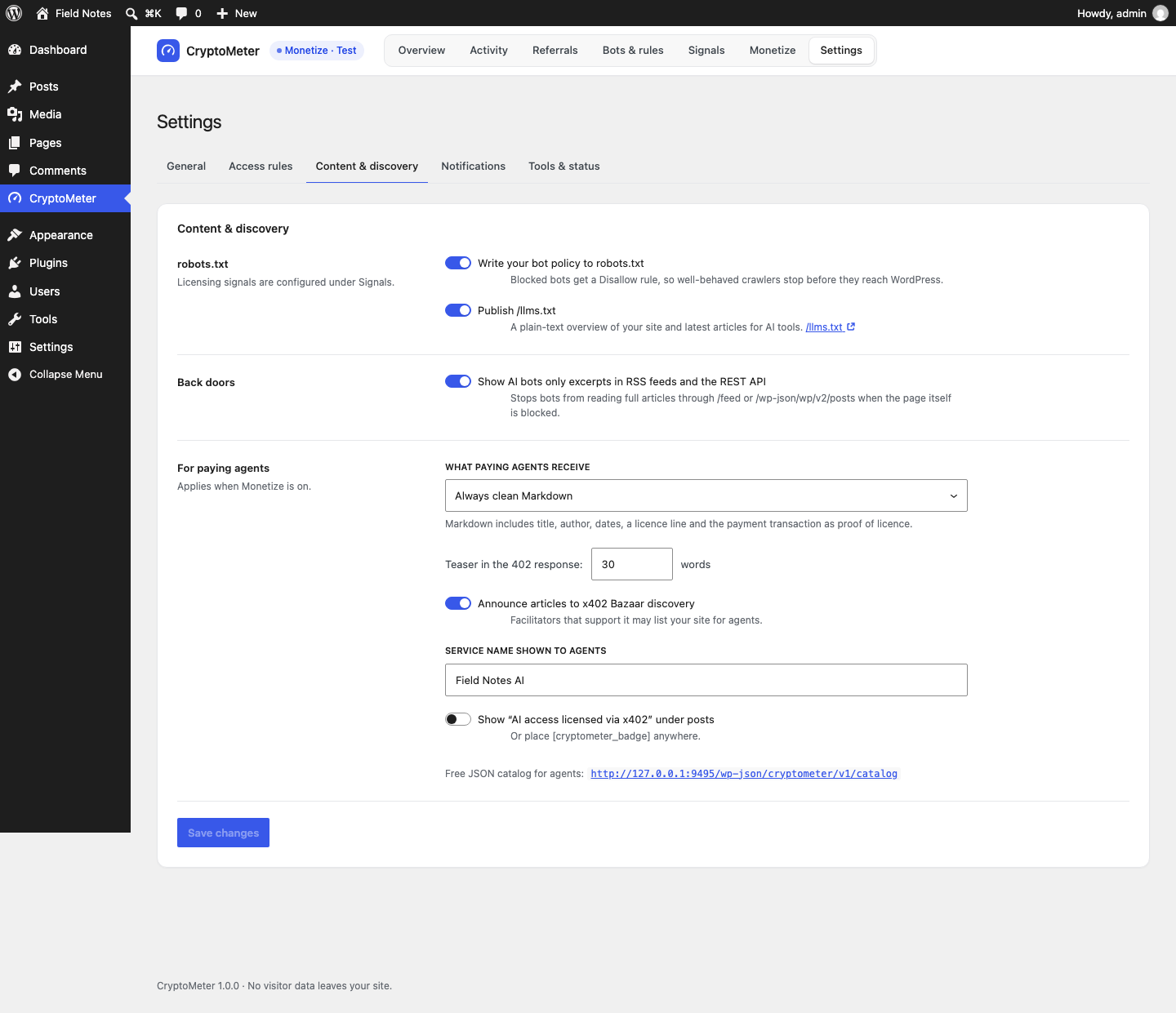
| Field | What it does | Default |
|---|---|---|
| Write your bot policy to robots.txt robots_sync | Adds User-agent: … / Disallow: / for every AI bot whose policy is Block (never for search engines), plus a comment line pointing to /llms.txt. Signal lines are controlled under Signals. | On |
| Publish /llms.txt llms_txt | A plain-text overview (llmstxt.org style): site name and tagline, an "AI access and licensing" section, a link to the free JSON catalog and your 30 latest articles (posts set to Blocked are left out). Off = 404. | On |
| Show bots set to Charge only excerpts in RSS feeds and the REST API protect_feeds | For bots set to Charge (Monetize set up): excerpts only in feeds, archives and /wp-json/wp/v2/…. Bots set to Block are refused on feeds (403) and get empty content from the core REST API whether or not this is on. | On |
| What paying agents receive serve_format (Monetize) | Automatic (Markdown if the agent sends Accept: text/markdown, JSON for application/json without text/html, otherwise the page), Always clean Markdown, or Always the normal HTML page. | Automatic |
| Teaser in the 402 response teaser_words (Monetize) | Words of preview in the 402 body and in excerpts. 0-500. | 60 |
| Announce articles to x402 Bazaar discovery bazaar (Monetize) | Adds the x402 "bazaar" extension to the challenge. Whether a facilitator lists your site is up to it. | Off |
| Service name shown to agents service_name (Monetize) | Up to 32 ASCII characters, sent as serviceName. | empty |
| Show "AI access licensed via x402" under posts badge (Monetize) | Badge under metered posts (only when payments are set up); or place [cryptometer_badge] anywhere. | Off |
Notifications
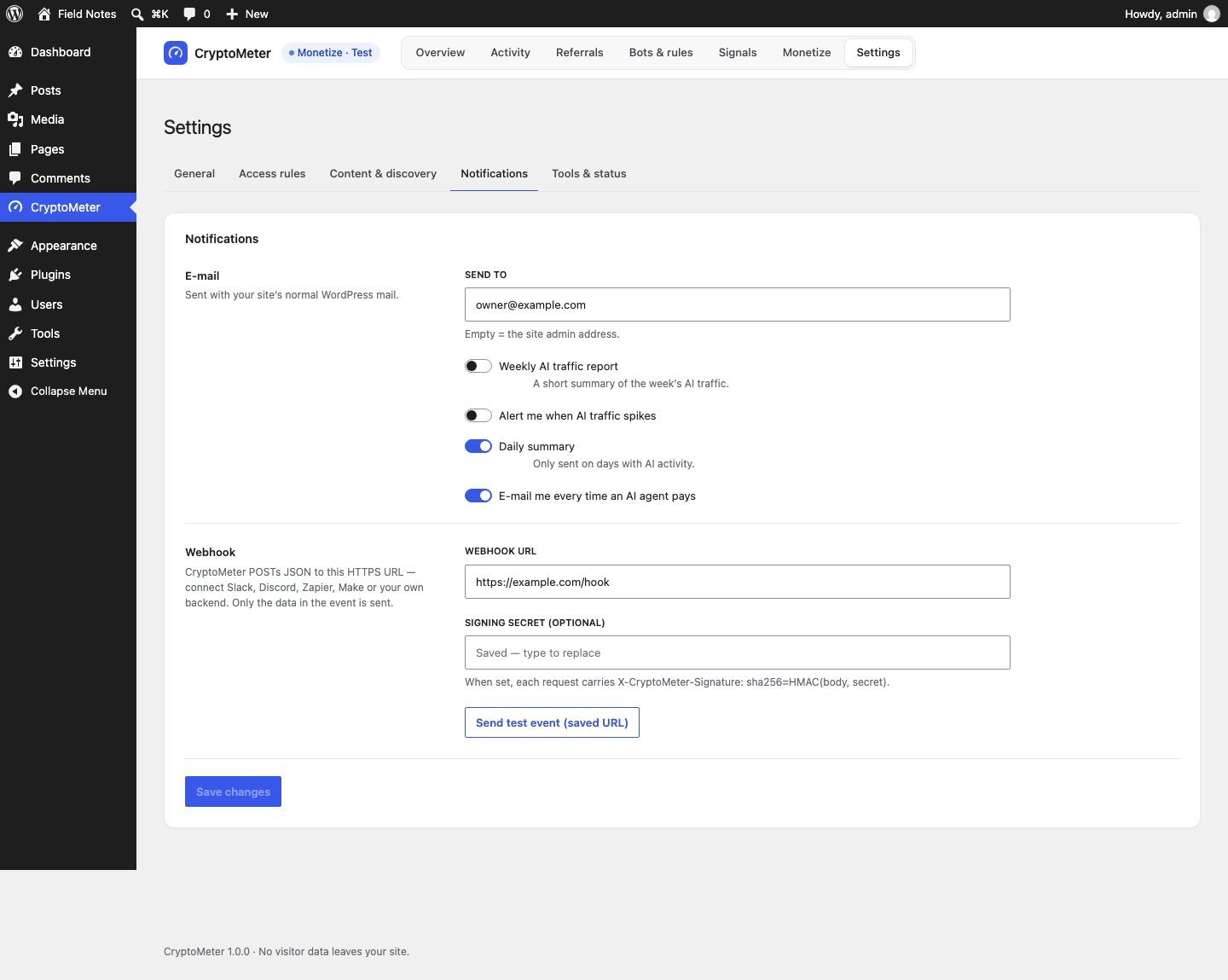
| Field | What it does | Default |
|---|---|---|
| Send to notify_email | Recipient. Empty = the site admin address. | empty |
| Weekly AI traffic report notify_weekly | Once a week (WP-Cron): AI bot requests, verified, spoofed, blocked, visitors referred by AI assistants (visible referrer only), the crawl-to-referral ratio and the top 5 companies (bot requests / referrals). Not sent in a week without AI requests or referrals. | Off |
| Alert me when AI traffic spikes spike_alert, spike_factor | Checked every hour: an e-mail is sent when the last hour had at least 50 AI requests and more than the factor × the average hour of the previous 7 days. At most one alert per 6 hours. (The on-screen wording talks about a day; the code compares hours.) Factor 2-100. | Off, × 5 |
| Daily summary notify_digest | Yesterday's numbers (UTC): earned, paid reads, AI bot visits, blocked, unpaid demand. Only sent on days with AI activity. | Off |
| E-mail me every time an AI agent pays notify_each (Monetize) | One e-mail per settled payment. | Off |
| Webhook URL webhook_url | An https:// URL that receives a JSON POST after every settled payment (Monetize). See Webhooks. | empty |
| Signing secret (optional) webhook_secret | Adds X-CryptoMeter-Signature: sha256=…. Masked after saving. | empty |
| Send test event (saved URL) | Sends an event of type test and shows "Webhook delivered · HTTP …" or the error. | - |
E-mails use WordPress's wp_mail(). If you do not receive them, your site may need an SMTP plugin.
Tools & status
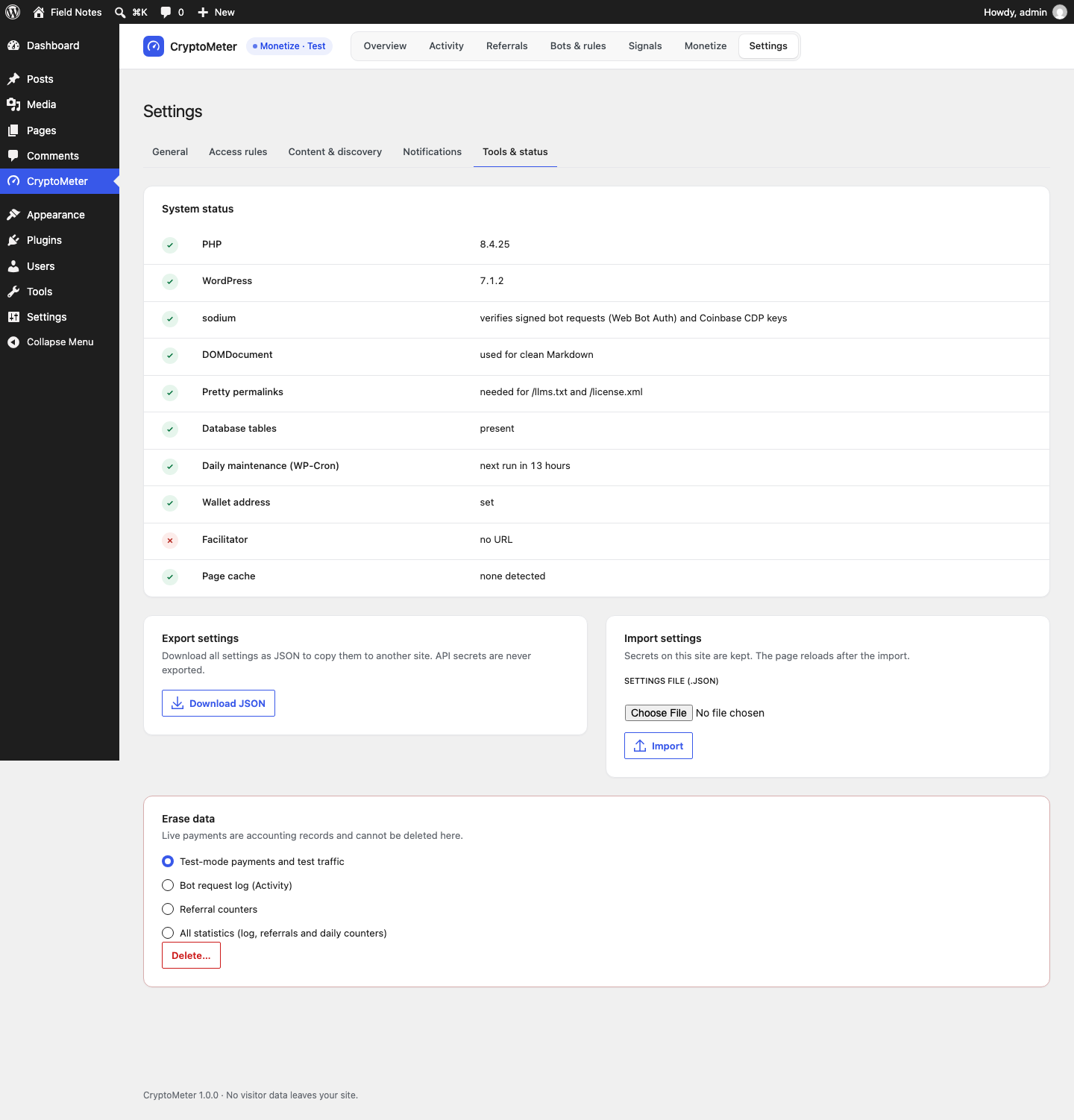
- System status: PHP, WordPress, sodium, DOMDocument, Pretty permalinks, Database tables, Daily maintenance (WP-Cron), Wallet address and Facilitator (only with Monetize), Page cache (detected plugins), Cloudflare (only when the request came through Cloudflare). Green = OK, amber = check, red = problem.
- Export settings → Download JSON. API secrets (CDP secret, bearer token, webhook secret) are never exported.
- Import settings: choose a
.jsonfile and press Import. Only known settings are imported and validated; secrets on this site are kept; the page reloads. A file from another plugin is rejected ("That is not a CryptoMeter settings file."). - Erase data: Test-mode payments and test traffic · Bot request log (Activity) · Referral counters · All statistics (log, referrals and daily counters). Press Delete…, tick "I understand this cannot be undone" and press Delete permanently. Live payments are accounting records and cannot be deleted here.
CryptoMeter also adds suggested text to Settings → Privacy → Policy Guide describing the bot log and the referral beacon.
wp-config.php constants
CryptoMeter has no .env file. Everything is in the admin screens, plus these optional constants (above /* That's all, stop editing! */):
| Constant | Purpose | Where to get the value |
|---|---|---|
CRYPTOMETER_CDP_KEY_ID | Coinbase CDP API key ID (Monetize). Overrides the stored value. | portal.cdp.coinbase.com |
CRYPTOMETER_CDP_KEY_SECRET | Coinbase CDP key secret (base64 Ed25519 or EC PEM). | Shown once when you create the key |
CRYPTOMETER_DELETE_LEDGER | Set to true before deleting the plugin to also remove the payment ledger and per-post/category prices. | Your decision |
13.How a request is handled
For front-end requests (pages, posts, archives, feeds, search) that reach WordPress, in this order:
- CryptoMeter switched off, admin, AJAX, previews, or a logged-in user → untouched, not logged.
- robots.txt,
/license.xml,/.well-known/tdmrep.json→ always served. - Classification by user agent (or Web Bot Auth signature) and verification. Not a known bot and not a generic client → human: untouched, not logged.
- Policy Block (including spoofed bots while "Block spoofed bots" is on) → 403, site-wide.
- Over the bot's per-bot rate limit → 429.
- Search engine → passes. AI bot on a post (of a metered type) set to Blocked in the editor → 403. Policy Allow → reads normally.
- Policy Charge (Monetize): access rules → price → no wallet yet (let through, counted as unpaid demand) → access pass → per-IP limit for unpaid requests → 402 or payment processing.
| Visitor | Response | X-CryptoMeter |
|---|---|---|
| Human, logged-in user, generic client (default) | 200, normal page | none |
| Search engine (verified, or check undecided) | 200, normal page | none |
| AI bot set to Allow (on a post of a metered type) | 200, normal page | free |
| Blocked bot, spoofed bot, or post set to Blocked | 403 with your block message | block |
| Over a rate limit | 429, Retry-After: 60 | limited |
| Bot set to Charge (Monetize set up) | 402 + x402 challenge | challenge |
| Agent that paid or has a valid access pass | 200 + content | paid |
Verified on a test install with the default preset: GPTBot 403 (block), Bytespider 403, ChatGPT-User 200 (free), normal browser 200, curl's default user agent 200. A spoofed search-engine user agent never gets the search-engine pass; with "Block spoofed bots" off it is treated like a generic HTTP client.
14.Verification explained
| Verdict | When |
|---|---|
| Verified | The IP is in the vendor's official list, or forward-confirmed reverse DNS matches the vendor's domain, or the request carries a valid Web Bot Auth signature from a trusted agent. |
| Spoofed | The bot has a verification method and the check definitely failed: the IP is in none of the (fresh) lists and reverse DNS does not confirm it, or reverse DNS gives a definite mismatch, or a signature is invalid for a bot without an IP list. |
| Unverified | The bot publishes no way to verify it (no list, no DNS, no signature), or you switched the methods off. |
| Unknown | The check could not decide: private or proxy IP, list not fetched yet or older than 3 days, DNS failure, or the DNS lookup budget (30 new lookups per minute) is used up. |
- Official IP lists are downloaded once a day (and with Refresh now), with a 10-second timeout and a 1 MB limit each, and stored with fetch time, count and status. On failure the last good copy is kept. A list older than 3 days is never used to call a request "Spoofed".
- Reverse DNS: the host name of the IP must end with the vendor's domain (for example
.googlebot.com,.search.msn.com,.applebot.apple.com) and resolve back to the same IP. Results are cached per IP for a day. - Web Bot Auth (RFC 9421 HTTP Message Signatures, Ed25519): headers
Signature,Signature-InputandSignature-Agent. Keys come fromhttps://chatgpt.com/.well-known/http-message-signatures-directory, cached a day. Only allow-listed agents are fetched (filtercryptometer_signature_agents). Needs PHP sodium. - No verification download happens during a visitor's request; lists and keys are fetched in the background.
- Behind a proxy or CDN, verification needs the real visitor IP: see Cloudflare and proxies. Local test requests (127.0.0.1) always show "Unknown".
Verified on a test install: Refresh now fetched all eight lists (18, 39, 229, 8, 4, 26, 317 and 28 ranges on 2026-09-24) and one key from chatgpt.com. Verified/spoofed verdicts for real crawler IPs are covered by the self-test with in-memory lists, not by live crawler traffic.
15.Page caches
A full-page cache can answer a request before WordPress and CryptoMeter run. The bot is then not verified, not logged and not blocked. This is the most common setup problem, so please check it.
What CryptoMeter already does
- Every response it changes (403, 429, 402, allowed AI bot on a metered post, paid content) sets
DONOTCACHEPAGEand sendsCache-Control: no-store, private, max-age=0andVary: User-Agent, Accept, PAYMENT-SIGNATURE, X-PAYMENT. - It detects WP Rocket, LiteSpeed Cache, W3 Total Cache, WP Super Cache, WP Fastest Cache, SiteGround Speed Optimizer, Breeze, Cache Enabler, Hummingbird and
WP_CACHE, and warns on the Overview, in System status and on Server & cache rules. - The referral beacon is sent by the visitor's browser, so referrals are counted even on cached pages.
This stops CryptoMeter's responses from being cached, but it cannot stop a cache from serving a page that was cached earlier for a human.
What you configure
- Open Bots & rules → Server & cache rules and use the snippet for your cache: WP Rocket (Never Cache User Agents list), LiteSpeed (no-cache rule), Nginx (FastCGI cache bypass). For other caches (Varnish, host-managed caches, Cloudflare APO), exclude or bypass requests whose User-Agent contains the fragments from the WP Rocket tab, or vary the cache on User-Agent. Ask your host if unsure.
- With Monetize, also never answer requests carrying
PAYMENT-SIGNATURE,X-PAYMENTorX-CryptoMeter-Accessfrom cache. - Clear all caches, run the loopback test again, and check from outside with the curl command from the Quick start (expect 403 and
x-cryptometer: blockfor GPTBot with the default preset).
Search engines pass anyway, so a cache serving them does no harm, except that a fake "Googlebot" served from cache is not detected.
16.Cloudflare and proxies
CryptoMeter needs the visitor's real IP for verification, IP allowlists, rate limits and the IP prefix in the log.
Cloudflare: automatic
When a request comes from a Cloudflare edge address (ranges from cloudflare.com/ips, built in as of 2026-09-23) and carries CF-Connecting-IP, that header is used as the visitor IP. Requests from other addresses cannot fake it. The Cloudflare row in System status confirms it. If another proxy sits in front of Cloudflare, or Cloudflare publishes new ranges, use a must-use plugin:
- Create
wp-content/mu-plugins/if it does not exist. - Create a file, for example
cryptometer-custom.php, starting with<?php, and add the snippet. Must-use plugins load automatically.
<?php
// Always trust CF-Connecting-IP (only if ALL traffic reaches your server through Cloudflare).
add_filter( 'cryptometer_trust_cloudflare', '__return_true' );

// Add a range Cloudflare publishes later.
add_filter( 'cryptometer_cloudflare_ranges', function ( $ranges ) {
	$ranges[] = '198.51.100.0/24'; // example
	return $ranges;
} );
Other proxies and load balancers
<?php
// Behind your own load balancer or reverse proxy (not Cloudflare).
add_filter( 'cryptometer_client_ip', function ( $ip ) {
	$trusted_proxies = array( '10.0.0.5' ); // the address(es) of YOUR proxy
	$remote          = isset( $_SERVER['REMOTE_ADDR'] ) ? $_SERVER['REMOTE_ADDR'] : '';
	if ( in_array( $remote, $trusted_proxies, true ) && ! empty( $_SERVER['HTTP_X_FORWARDED_FOR'] ) ) {
		$parts = explode( ',', $_SERVER['HTTP_X_FORWARDED_FOR'] );
		$first = trim( $parts[0] );
		if ( filter_var( $first, FILTER_VALIDATE_IP ) ) {
			return $first;
		}
	}
	return $ip;
} );
Never trust X-Forwarded-For from everyone: any client can send it and pretend to be an allowlisted IP or a verified bot.
17.Webhooks and signatures
After every settled Monetize payment CryptoMeter sends a JSON POST to your webhook URL (Settings → Notifications). Only https://; private and internal addresses are refused (WordPress "safe" HTTP API); redirects are not followed; sent in the background with a short timeout and not retried (use the ledger or CSV as the source of truth). Headers: Content-Type: application/json, User-Agent: CryptoMeter/1.0.0, X-CryptoMeter-Event (payment.settled or test) and, with a secret, X-CryptoMeter-Signature: sha256=<hex>.
{
  "event": "payment.settled",
  "id": "423618ba-fa43-48b0-b59e-4d8acd8b362b",
  "created_at": "2026-09-23T09:59:28+00:00",
  "mode": "test",
  "site": "https://your-site.example/",
  "post": { "id": 4, "title": "Your post", "url": "https://your-site.example/your-post/" },
  "amount_usdc": "0.01",
  "network": "eip155:84532",
  "network_label": "Base Sepolia (testnet)",
  "transaction": "0x...",
  "explorer": "https://sepolia.basescan.org/tx/0x...",
  "payer": "0x...",
  "bot": "GPTBot",
  "bot_type": "training"
}
The test button sends "event": "test". The weekly report and spike alert are e-mail only; they are not sent to the webhook.
Verify the signature
HMAC-SHA256 of the raw body with your secret, in hex, prefixed with sha256=. Compare in constant time.
<?php
// webhook-receiver.php on YOUR server (not inside WordPress).
$secret   = getenv( 'CRYPTOMETER_WEBHOOK_SECRET' );
$body     = file_get_contents( 'php://input' );
$sent     = isset( $_SERVER['HTTP_X_CRYPTOMETER_SIGNATURE'] ) ? $_SERVER['HTTP_X_CRYPTOMETER_SIGNATURE'] : '';
$expected = 'sha256=' . hash_hmac( 'sha256', $body, $secret );
if ( ! hash_equals( $expected, $sent ) ) {
	http_response_code( 401 );
	exit( 'bad signature' );
}
$event = json_decode( $body, true );
http_response_code( 200 );
echo 'ok';
// receiver.mjs (Node.js, no dependencies)
import http from 'node:http';
import crypto from 'node:crypto';
const SECRET = process.env.CRYPTOMETER_WEBHOOK_SECRET;
http.createServer( ( req, res ) => {
const chunks = [];
req.on( 'data', ( c ) => chunks.push( c ) );
req.on( 'end', () => {
const raw = Buffer.concat( chunks );
const expected = 'sha256=' + crypto.createHmac( 'sha256', SECRET ).update( raw ).digest( 'hex' );
const sent = String( req.headers[ 'x-cryptometer-signature' ] || '' );
const ok = sent.length === expected.length &&
crypto.timingSafeEqual( Buffer.from( sent ), Buffer.from( expected ) );
if ( ! ok ) { res.writeHead( 401 ).end( 'bad signature' ); return; }
const event = JSON.parse( raw.toString( 'utf8' ) );
console.log( event.event, event.amount_usdc, event.transaction );
res.writeHead( 200 ).end( 'ok' );
} );
} ).listen( 8787 );Both receivers were tested against a signature produced by the plugin's code in the earlier verification round (2026-09-23); the signing code is unchanged in this version.
18.Public files and REST API
Public files
| Address | When | Content |
|---|---|---|
/robots.txt | Always (WordPress virtual robots.txt; site visible to search engines) | Your robots.txt plus Disallow blocks for blocked bots, Content-Signal / Content-Usage lines and, with RSL, a License: line. |
/llms.txt | Publish /llms.txt on | Plain text, cached 1 hour. Workaround under plain permalinks: /?cryptometer_llms=1. |
/license.xml | RSL on | application/rsl+xml, otherwise 404. |
/.well-known/tdmrep.json | TDMRep on | JSON, otherwise 404. |
Verified on a test install: /llms.txt 200; /license.xml and /.well-known/tdmrep.json 404 by default and 200 after switching them on.
REST API
Namespace /wp-json/cryptometer/v1 (with plain permalinks: /?rest_route=/cryptometer/v1/…).
| Route | Access | Purpose |
|---|---|---|
GET /catalog | public | Machine-readable list of articles (page, per_page 1-100, search). payments.enabled is false and prices are 0.00 while Monetize is not set up. |
GET /articles/{id} | public, always metered | Monetize's paid article API: 402 → pay → JSON. 404 cryptometer_not_found, 403 cryptometer_blocked (post set to Blocked), 503 cryptometer_disabled (CryptoMeter off). Editors of the post get it free. |
POST /beacon | public | Referral beacon; always answers 204. |
/admin/* | administrators (manage_options + REST nonce); anonymous calls get 401 | Power the admin screens (overview, activity, activity/live, referrals, bots, verification, verification/refresh, signals, signals/preview, rules, settings, monetize, privacy/erase, simulate, facilitator, webhook-test, live-test). Not meant for external use. |
Core WordPress REST API: for bots set to Block, /wp-json/wp/v2/… of metered post types returns empty content; for charged bots (Monetize) a teaser with content.protected: true and content.x402 pointing to the paid endpoint.
19.External services and privacy
CryptoMeter contacts these services. No data about your visitors is sent. Requests identify themselves as CryptoMeter/<version> (WordPress; <your site URL>). Every request has a timeout, and a failure never affects your visitors (the last good copy is kept).
| Service | When | What is sent | Switch |
|---|---|---|---|
| Official bot IP lists: openai.com/gptbot.json openai.com/searchbot.json openai.com/chatgpt-user.json www.perplexity.ai/perplexitybot.json www.perplexity.ai/perplexity-user.json claude.com/crawling/bots.json developers.google.com/static/crawling/ipranges/common-crawlers.json www.bing.com/toolbox/bingbot.json | Once a day by WP-Cron, shortly after activation/update, and on "Refresh now" | A plain GET (your site URL is in the User-Agent) | Check official IP lists (turning it off stops the lists being used; the daily download still runs) |
| Web Bot Auth key directory https://chatgpt.com/.well-known/http-message-signatures-directory | At most once a day (daily refresh, or after a signed request when the cached keys are older than a day) | A plain GET | Check signed requests (Web Bot Auth) |
| Reverse DNS | When an IP claims to be a search engine or a Google AI bot; cached a day; max 30 new lookups a minute | The IP, to your server's own DNS resolver | Verify search engines by reverse DNS |
| x402 facilitator (Monetize only) | When an agent pays, and when you press Check facilitator | The agent's payment payload | Monetize off |
| Your webhook URL (only if set) | After a settled payment, and the test button | The payment event | Leave empty |
Terms: those of each vendor's or service's website. The admin app and this documentation load no external fonts or scripts.
What is stored
| Where | What |
|---|---|
{prefix}cryptometer_log | One row per bot request: time, bot, intent, verdict, method, decision, status, bytes, post, path (max 255 characters), IP network prefix (IPv4 /24, IPv6 /48), robots.txt violation flag, mode. Never humans. 90 days by default. |
{prefix}cryptometer_referrals | Day × assistant × post counters. No IP, no cookie. |
{prefix}cryptometer_hits | Daily counters per post, bot and outcome. No IP. |
{prefix}cryptometer_payments | Monetize payments (payer wallet address, amount, network, transaction, status and so on). |
| Options | cryptometer_settings (secrets masked in forms, never exported), cryptometer_secret, cryptometer_errors, cached IP lists cryptometer_iplist_* and key directories cryptometer_sigdir_* (not autoloaded). |
Transients cryptometer_* | Rate-limit counters (hashed keys, about 2 minutes), reverse-DNS results per IP hash (1 day), cached robots.txt rules (1 hour). |
An IP network prefix and a payer wallet address can count as personal data in some jurisdictions; mention them in your privacy policy if that applies to you (see the suggested text under Settings → Privacy).
20.Developer hooks
Put customisations in a must-use plugin (how) or your own plugin, never in CryptoMeter's files.
| Hook | Arguments | Use it to |
|---|---|---|
cryptometer_bots | array $bots keyed by id: name, vendor, match, type (training, search_ai, agent, search), optional policy, rdns, signature_agent | Add or change bots |
cryptometer_generic_clients | string[] | Change the generic HTTP client list |
cryptometer_ip_sources | array id => {vendor, url, bots[]} | Add or change official IP lists |
cryptometer_ip_list_max_age | int seconds (default 3 days) | How old a list may be to call a miss "Spoofed" |
cryptometer_signature_agents | string[] origins (default https://chatgpt.com) | Trust more Web Bot Auth agents |
cryptometer_rdns_per_minute | int, default 30 | Reverse-DNS lookup budget |
cryptometer_referral_vendors | array id => {label, hosts[], bot_vendor, bots[]|null} | Add AI assistants for referral counting |
cryptometer_beacon_per_minute | int, default 30 | Beacon limit per visitor |
cryptometer_log_request | bool $log, array $client | Skip logging for some requests |
cryptometer_spike_min_hits | int, default 50 | Minimum hourly requests for a spike alert |
cryptometer_content_usage | string $value, array $config | Adjust the Content-Usage value if the IETF draft changes |
cryptometer_license_xml | string $xml, array $config | Change the RSL document |
cryptometer_llms_txt | string | Change /llms.txt |
cryptometer_client_ip, cryptometer_trust_cloudflare, cryptometer_cloudflare_ranges | see section 16 | Real visitor IP |
cryptometer_price | float $usd, int $post_id | Final price (Monetize) |
cryptometer_networks, cryptometer_facilitators, cryptometer_facilitator_request_args, cryptometer_max_failed_payments, cryptometer_license | see the code comments | Monetize networks, facilitator presets, facilitator request args, failed-payment throttle (default 10 per IP per minute), licence line in paid content |
cryptometer_payment_settled (action) | $post_id, $settle, $client, $quote | React to a settled payment |
Examples
<?php
/**
 * Plugin Name: CryptoMeter customisations
 */

// 1. Recognise an extra AI crawler (appears in the AI training group).
add_filter( 'cryptometer_bots', function ( $bots ) {
	$bots['examplebot'] = array(
		'name'   => 'ExampleBot',
		'vendor' => 'Example Inc.',
		'match'  => 'ExampleBot', // case-insensitive user-agent substring
		'type'   => 'training',   // training | search_ai | agent | search
	);
	return $bots;
} );

// 2. Do not log requests to a health-check URL.
add_filter( 'cryptometer_log_request', function ( $log, $client ) {
	$uri = isset( $_SERVER['REQUEST_URI'] ) ? $_SERVER['REQUEST_URI'] : '';
	return false === strpos( $uri, '/healthz' ) ? $log : false;
}, 10, 2 );

// 3. Count visits from another AI assistant.
add_filter( 'cryptometer_referral_vendors', function ( $vendors ) {
	$vendors['example'] = array(
		'label'      => 'Example AI',
		'hosts'      => array( 'chat.example.ai' ),
		'bot_vendor' => 'Example Inc.', // compare with bots of this vendor
		'bots'       => null,           // or an explicit list of bot ids
	);
	return $vendors;
} );

// 4. Add a section to /llms.txt.
add_filter( 'cryptometer_llms_txt', function ( $txt ) {
	return $txt . "\n## Licensing contact\n\nlicensing@example.com\n";
} );
Hook names and arguments were checked against the code. Examples 2 and 3 were reviewed, not run. The referral beacon script lists the vendor hosts when the page is rendered, so a vendor added with the filter is included automatically.
21.Security model
- All admin screens and
/admin/*REST routes requiremanage_optionsand a WordPress REST nonce; export/import use admin nonces. - Outbound requests use the WordPress safe HTTP API with timeouts and size limits; verification data is fetched in the background, never during a visitor's request.
- Full visitor IPs are not stored; the log keeps the network prefix only.
- Signature verification only fetches key directories of allow-listed agents; unknown or invalid signatures fall back to IP/DNS checks.
- Monetize is non-custodial: public wallet address only; exact amount, recipient, network, validity and replay checks (unique nonce) before the facilitator; failed-payment throttle; CSV formula neutralisation.
- User agents can be faked. Unverifiable bots can only be judged by user agent; bots that pose as browsers are not recognised. Use IP rules for partners. Logged-in users are never blocked, logged or charged, so do not give AI companies WordPress accounts.
22.Customization
CryptoMeter is a WordPress plugin, so there is no app name, bundle ID or icon set to change. The admin follows your WordPress admin colour scheme. What you can customise:
| What | How |
|---|---|
| Which bots are allowed or blocked | Bots & rules (presets, intents, per-bot exceptions, custom user agents), cryptometer_bots |
| Text blocked bots see | Settings → Access rules → Blocked bots (HTTP 403) |
| Licensing signals | Signals; cryptometer_content_usage, cryptometer_license_xml |
| /llms.txt | Settings → Content & discovery; cryptometer_llms_txt |
| Monetize texts | 402 message, service name, badge (style .cryptometer-badge in your theme), cryptometer_license |
| Admin language | Translation |
Do not edit the plugin's files; changes are lost on update. The admin app source is in admin-app/src/ and compiles to a single bundle in build/ with npm install and then npm run build inside admin-app (@wordpress/scripts). You only need this if you change the source; this build step was not re-run for this documentation.
23.Deployment checklist
- Install on staging first if you can. Run the self-test.
- Choose a preset and review the intent cards. Remember that blocking AI search & answers can reduce AI citations.
- Press Refresh now on Verification sources; all lists should be green.
- Page cache: loopback test plus an outside curl check; install the cache snippet if needed.
- Optional: server/CDN rules from Server & cache rules (back up the config first).
- Signals: decide on RSL, TDMRep and noai; check the preview; make sure no physical robots.txt hides the virtual one.
- Turn on the weekly report (and spike alert) under Notifications.
- Update your privacy policy with the suggested text.
- Monetize only: Test mode with the Simulator and ideally one demo payment on staging; then Mode Live, live networks, PayAI / Coinbase CDP / your facilitator (x402.org is testnet only), Check facilitator (saved settings), and watch the ledger and facilitator errors in the first days. Do not leave Test mode running on production: bots set to Charge would receive testnet challenges that cannot earn anything.
Staging to production: Settings → Tools & status → Download JSON on staging, Import on production. Secrets are not included; re-enter them or use the wp-config constants.
24.Updating
- Download the new version from your CodeCanyon downloads page.
- Recommended: Settings → Tools & status → Download JSON, and back up your database.
- Plugins → Add New Plugin → Upload Plugin → choose the new
cryptometer.zip→ Install Now → Replace current with uploaded. (Or overwritewp-content/plugins/cryptometerby FTP.) - Database and settings changes are applied automatically on the next page load.
Do not delete the plugin in order to update it. Deleting runs the uninstall routine, which removes settings, the activity log and statistics.
Coming from an earlier CryptoMeter build (pay-per-read layout)
If your site ran a pre-release build with the older screens (Dashboard, Payments, AI Bots, Simulator, Setup wizard), settings are migrated once: if a wallet was set, Monetize is switched on and AI agents and training crawlers stay on Charge; otherwise the default "Get cited, block training" applies. Existing per-bot choices are kept as exceptions. Old admin bookmarks (page=cryptometer-payments, -bots, -settings, -simulator, -setup) redirect to the matching new screen.
25.Self-test
CryptoMeter ships with a self-test that checks pricing, bot classification, intents and presets, IP-list verification, Web Bot Auth signatures (with a locally generated key), the robots.txt parser, signals output, referral vendors, rule snippets, header decoding, access passes, settings sanitisation, CDP JWT signing and the 402 decision engine. It makes no network calls; settings, IP lists and keys are overridden in memory only and never saved; the temporary posts and categories it creates are deleted at the end (or on shutdown if interrupted).
It needs WP-CLI (many hosts provide it over SSH). From your WordPress folder, with the plugin active (a staging copy is ideal):
wp eval-file wp-content/plugins/cryptometer/tests/run-tests.phpExpected output:
CryptoMeter self-test: 173/173 passedFailures are listed as FAIL <name>. Verified result: 173/173 on WordPress 7.1.2 with PHP 8.4.25 (WordPress Playground, SQLite, 2026-09-24; the file was included through a local test harness rather than WP-CLI). The 173/173 result on PHP 7.4.33 is reported by the build team and was not re-run for this documentation. If you added your own cryptometer_price or cryptometer_bots filters, they still apply during the test, so some checks may report different values.
26.Deactivate and uninstall
Deactivate
Stops everything immediately: no blocking, no logging, no signals. Scheduled tasks are removed; settings and data stay, so you can reactivate at any time.
Delete (uninstall)
Deleting the plugin from the Plugins screen removes (on every site of a multisite network):
- Options
cryptometer_settings,cryptometer_secret,cryptometer_errors,cryptometer_db_version,cryptometer_spike_sent,cryptometer_rewrite_version - Tables
{prefix}cryptometer_log,{prefix}cryptometer_referrals,{prefix}cryptometer_hits - Cached IP lists and key directories, scheduled tasks and
cryptometer_*transients
It keeps the payment ledger ({prefix}cryptometer_payments) and per-post/category prices, because the ledger is your accounting record. To delete them too, add this before deleting the plugin (export a CSV first if you need the records):
define( 'CRYPTOMETER_DELETE_LEDGER', true );After uninstalling, remove any server or CDN rules you copied from Server & cache rules; they live in your server configuration, not in WordPress.
27.Troubleshooting
Where to look: Activity (what happened to each request), Settings → Tools & status, Bots & rules → Verification sources, the loopback test, and the X-CryptoMeter response header.
No AI visits appear
- Normal on a new or small site: AI bots visit irregularly. The screens say "Collecting since …".
- A page cache serves the bots (run the loopback test, see Page caches), or a CDN/firewall rule stops them before WordPress.
- CryptoMeter is paused (Settings → General).
- You tested while logged in.
Everything shows "Unknown"
- Lists not fetched yet: press Refresh now. If a list shows an error, your host may block outgoing HTTPS; ask it to allow the URLs in section 19.
- Your site is behind a proxy/CDN and sees the proxy's (often private) IP: configure the real visitor IP.
- WP-Cron does not run (low traffic or
DISABLE_WP_CRON), so lists become older than 3 days. Set up a real cron job forwp-cron.php.
A genuine bot shows "Spoofed"
- Your server sees a wrong IP (proxy): fix the visitor IP first.
- The vendor's list changed after the last refresh: press Refresh now.
- Your own SEO tool uses a search-engine user agent: switch off "Block spoofed bots" for it to be treated as a generic client, or give it its own user agent.
A bot I blocked still reads my pages
- Page cache (most common).
- The bot is not recognised (browser-like user agent) or uses a user agent not in the list: add it under Custom AI user agents.
- A per-bot exception overrides the intent policy.
- It reads files outside WordPress (images, static files). CryptoMeter only sees requests WordPress handles; use the server rules.
Referrals stay at 0
- Referral counting is off (Settings → General), or you tested while logged in.
- The assistant hid the referrer (common in apps). Test with
https://your-site.example/?utm_source=chatgpt.comin a private window. - A script blocker, strict Content Security Policy or JavaScript optimisation plugin removes inline scripts, or a security plugin blocks
/wp-json/cryptometer/v1/beacon.
robots.txt does not show CryptoMeter's lines
- A physical
robots.txtfile exists in the web root (the Signals preview shows it). Remove it or edit it by hand. - Settings → Reading → "Discourage search engines" is ticked (site not public), or CryptoMeter is paused.
- An SEO plugin replaces the robots.txt output entirely.
/llms.txt, /license.xml or /tdmrep.json return 404
- The feature is off.
- Plain permalinks: choose any other structure under Settings → Permalinks and save (this also refreshes rewrite rules). For llms.txt,
/?cryptometer_llms=1works as a workaround. - A physical file or a server rule for
.txt,.xmlor.well-knowntakes precedence.
HTTP 429 for a bot
A per-bot rate limit (Bots & rules), or with Monetize the per-IP limit for unpaid requests or the failed-payment throttle. All send Retry-After: 60. Behind a proxy without the real IP, all visitors share one IP.
The admin shows an error
- "The server did not answer with JSON…" or "Your session has expired.": reload the page and log in again; a security plugin or a PHP error may have interrupted the request.
- "The admin app is missing (build/ folder)": re-install the plugin from the original ZIP.
- "The CryptoMeter dashboard needs WordPress 6.6 or newer": update WordPress.
- "Database tables: missing" or "Daily maintenance: not scheduled" in System status: deactivate and activate the plugin.
E-mails do not arrive
Check the recipient and that your site can send mail (SMTP plugin). The weekly report and daily summary are skipped in periods without AI activity; the spike alert needs at least 50 requests in an hour.
Monetize problems
| Code | HTTP | Meaning and fix |
|---|---|---|
invalid_exact_evm_insufficient_balance | 402 | The paying wallet lacks USDC on that network (normal for unfunded wallets). |
invalid_exact_evm_signature | 402 | Signature not valid for this payment; the agent must sign again with the values from the challenge. |
nonce_already_used | 402 | Replay protection: sign a new payment. |
too_many_failed_payments | 429 | More than 10 failed verifications from this IP in a minute. |
invalid_payment_requirements, …_recipient_mismatch, …_value_mismatch | 402 | Amount, network, token or recipient differ from the offer (for example the price changed). Request again. |
…_valid_before / …_valid_after | 402 | Expired or not yet valid; check the agent's clock. |
invalid_payload, invalid_x402_version | 400 | Malformed header, or v1 while v1 is not accepted. |
network_error: … | 502 | Facilitator unreachable from your server. |
settlement_pending | 402 | Still pending after one retry; the ledger row is Unconfirmed. |
cdp_credentials_missing, cdp_key_invalid_pem, cdp_key_invalid_ed25519, cdp_sodium_missing | - | Coinbase CDP key problems; re-enter the key (PEM line breaks as \n), check sodium in System status. |
facilitator_not_configured | - | "Custom facilitator URL" selected without a URL. |
- Bots set to Charge get 200 instead of 402: Monetize off, no valid wallet, post type not ticked under Content types, free by an access rule or price 0, or a page cache.
- Wallet will not save: exactly 0x + 40 hex characters, no ENS names.
- "This facilitator is testnet-only": x402.org cannot be used in Live mode.
28.FAQ
Does this hurt my Google ranking?
Not with the default settings. Search engines are allowed, fake search bots are detected by the official IP lists and DNS, and humans are never touched. Blocking the "Search engines" intent would remove your site from search results; the screen warns you.
Does blocking training crawlers stop my content from being used for AI?
It stops the bots CryptoMeter recognises from reading pages that reach WordPress, and tells well-behaved crawlers not to crawl (robots.txt) and not to train (signals). It cannot stop bots that disguise themselves as browsers, content copied elsewhere, or data collected before you installed it.
Does robots.txt stop AI bots?
Only the ones that respect it. CryptoMeter writes the rules, enforces Block with HTTP 403, and shows which bots requested disallowed URLs (Ignored robots.txt).
Why are my referral numbers so low?
Many AI apps hide the referrer, so the numbers are a minimum. They are still useful for comparing companies and posts over time.
Does any data leave my site?
No visitor data. CryptoMeter downloads public IP lists and a public key directory, asks your server's DNS resolver about bot IPs and, with Monetize, talks to your facilitator when an agent pays. See External services.
Do I need Monetize or a crypto wallet?
No. Monetize is off by default; everything else works without it.
Which AI companies pay today?
Any client that implements x402 can pay. Large crawlers mostly do not pay yet. We make no earnings promises.
Where does the money go, and does the plugin hold funds?
Straight to the wallet you enter, as USDC on the network the agent chose. The agent signs, the facilitator submits, your wallet receives. The plugin stores only your public address.
Can I let one AI company in (for example a licensing partner)?
Set that bot to Allow on Bots & rules. With Monetize, you can also add its IP ranges under Access rules so it reads free.
Does it work with my page cache or CDN?
Yes, if the cache lets AI bots reach WordPress. Use the snippets and the loopback test.
What happens to my data if I remove the plugin?
Settings, log and statistics are deleted; the payment ledger is kept unless you set CRYPTOMETER_DELETE_LEDGER.
29.Translation
CryptoMeter is translation-ready. Text domain: cryptometer. The template languages/cryptometer.pot contains 734 strings, from the PHP code and from the admin app.
- Open the
.potfile in Poedit or a plugin such as Loco Translate and create a translation for your language. - Save it as
cryptometer-<locale>.po/.mo(for examplecryptometer-de_DE.mo). The admin app additionally needs WordPress's JSON translation file for its script, which Loco Translate orwp i18n make-jsoncreates from the.pofile. - Upload the files to
wp-content/languages/plugins/(survives plugin updates).
The JSON step follows the standard WordPress mechanism for script translations; a translated admin app was not verified by the documentation author.
Some texts that bots receive (403/402 messages, llms.txt, licence lines) are translated too, so bots see them in your site language. Override them under Access rules or with the filters.
30.Changelog
1.0.0 (first public release)
- Verified bot identity: official IP lists (OpenAI, Perplexity, Anthropic, Google, Microsoft), forward-confirmed reverse DNS, Web Bot Auth signatures; Verified / Spoofed / Unverified / Unknown verdicts; Block spoofed bots.
- Activity log with live feed, filters and robots.txt violation detector.
- AI referral tracking for 10 assistants with crawl-to-visit ratios.
- Policies per intent with presets, per-bot exceptions and per-bot rate limits.
- Signals: Content-Signal, IETF Content-Usage (draft), RSL license.xml, TDMRep, noai, with preview.
- Server & cache rule snippets (Nginx, Apache, LiteSpeed, Cloudflare, WP Rocket) and loopback test.
- Weekly report, spike alert, daily summary, webhook.
- React admin (Overview, Activity, Referrals, Bots & rules, Signals, Monetize, Settings).
- Optional Monetize module: x402 v2 with v1 compatibility, USDC on Base, Polygon, Arbitrum and Avalanche, four facilitator options, pricing rules, ledger and CSV, simulator.
31.Credits and licences
- CryptoMeter plugin (PHP, CSS, JavaScript in the
cryptometerfolder): © MIKODES, GPL-2.0-or-later (gnu.org/licenses/gpl-2.0.html). No third-party PHP libraries. - Admin app: built with
@wordpress/scriptson WordPress's own packages (@wordpress/element,@wordpress/components,@wordpress/i18n,@wordpress/api-fetch, loaded from WordPress core at runtime) plus@wordpress/icons17.0.0, which is bundled intobuild/index.js. All GPL-2.0-or-later. - Standards implemented from their public specifications: Content Signals (contentsignals.org, CC0), IETF aipref drafts (Content-Usage), RSL 1.0 (rslstandard.org), W3C TDMRep, RFC 9309 (robots.txt), RFC 9421 (HTTP Message Signatures) / Web Bot Auth, and the x402 specification (x402.org) for Monetize.
- Optional demo client
tools/pay-demo.mjsdepends on viem (MIT) and its MIT-licensed dependencies, downloaded bynpm installand never loaded by WordPress. Full list in THIRD-PARTY-LICENSES. - Screenshots in this documentation are real CryptoMeter admin screens from a MIKODES test installation (WordPress Playground) with test data and scripted test requests, captured on 2026-09-24.
- This documentation uses system fonts only and loads no external files.
- Trademarks (WordPress, OpenAI, ChatGPT, Anthropic, Claude, Google, Gemini, Microsoft, Copilot, Perplexity, Cloudflare, Coinbase and others) belong to their owners. Naming a company or bot does not imply endorsement.
32.Support policy
Support is provided through the Support tab on the CryptoMeter item page on CodeCanyon, following Envato's item support policy.
| Covered | Not covered |
|---|---|
|
|
Before you ask, please include
- Your WordPress and PHP versions and the rows from Settings → Tools & status → System status
- What the Activity log and the loopback test show for the request in question
- The status of the lists on Bots & rules → Verification sources
- Which cache, CDN or security plugins you use
Never send a private key, seed phrase, CDP key secret, webhook secret or WordPress password in a support request. We will never ask for them.