 CryptoMeter
Crawlers cost bandwidth
Wikimedia reported bandwidth used for downloading multimedia content grew 50% since January 2024, driven mostly by automated scrapers.
Source: Wikimedia, 2025See which AI bots read your site, prove they are who they claim to be, decide who may read — and see how many visitors come back. All inside WordPress: no account, no monthly fee, no visitor data leaves your site.
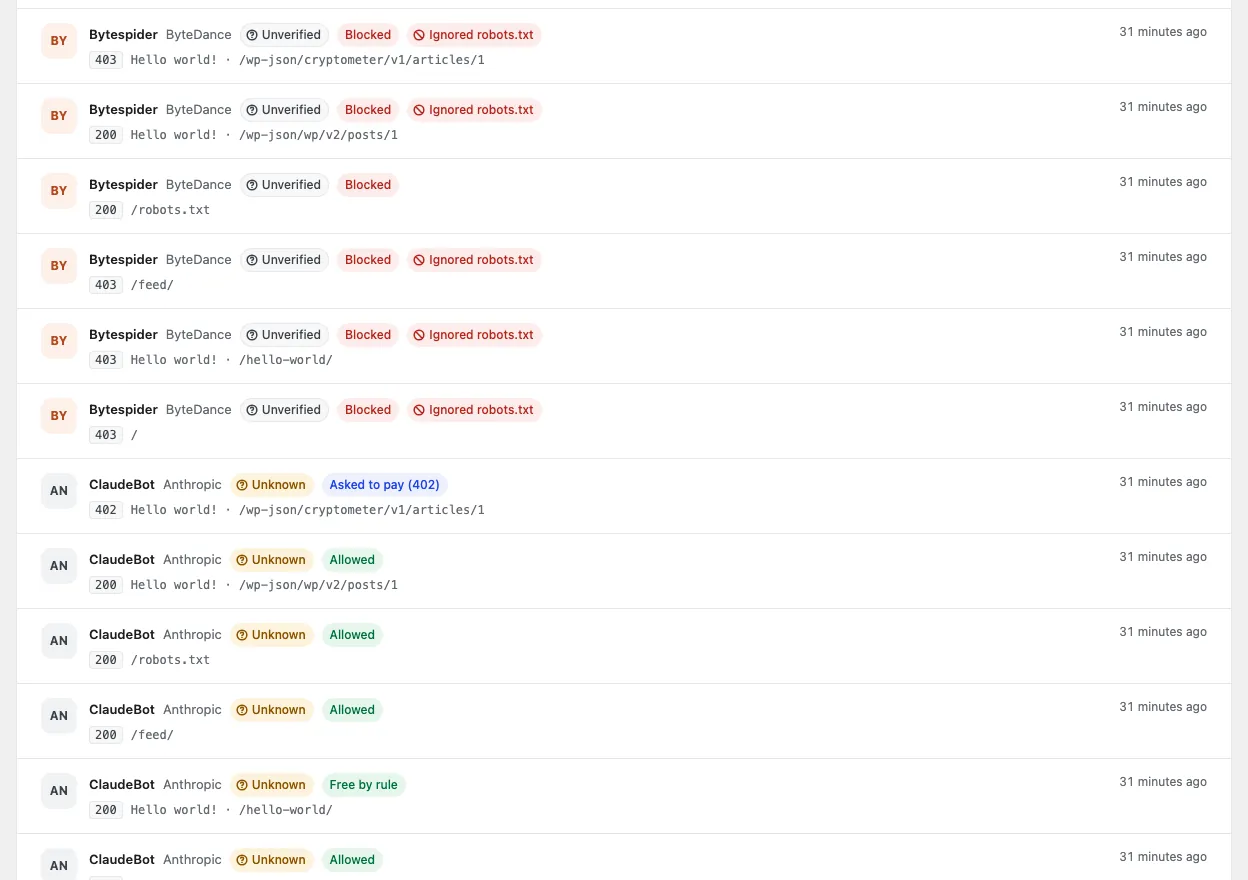
GET /hello-world/ user agent claims GPTBotopenai.com/gptbot.json VerifiedGET /pricing/ user agent claims GooglebotGET /guide/ signed request from ChatGPT agentIllustration of the decision path with example paths. Your own traffic appears in the Activity log.
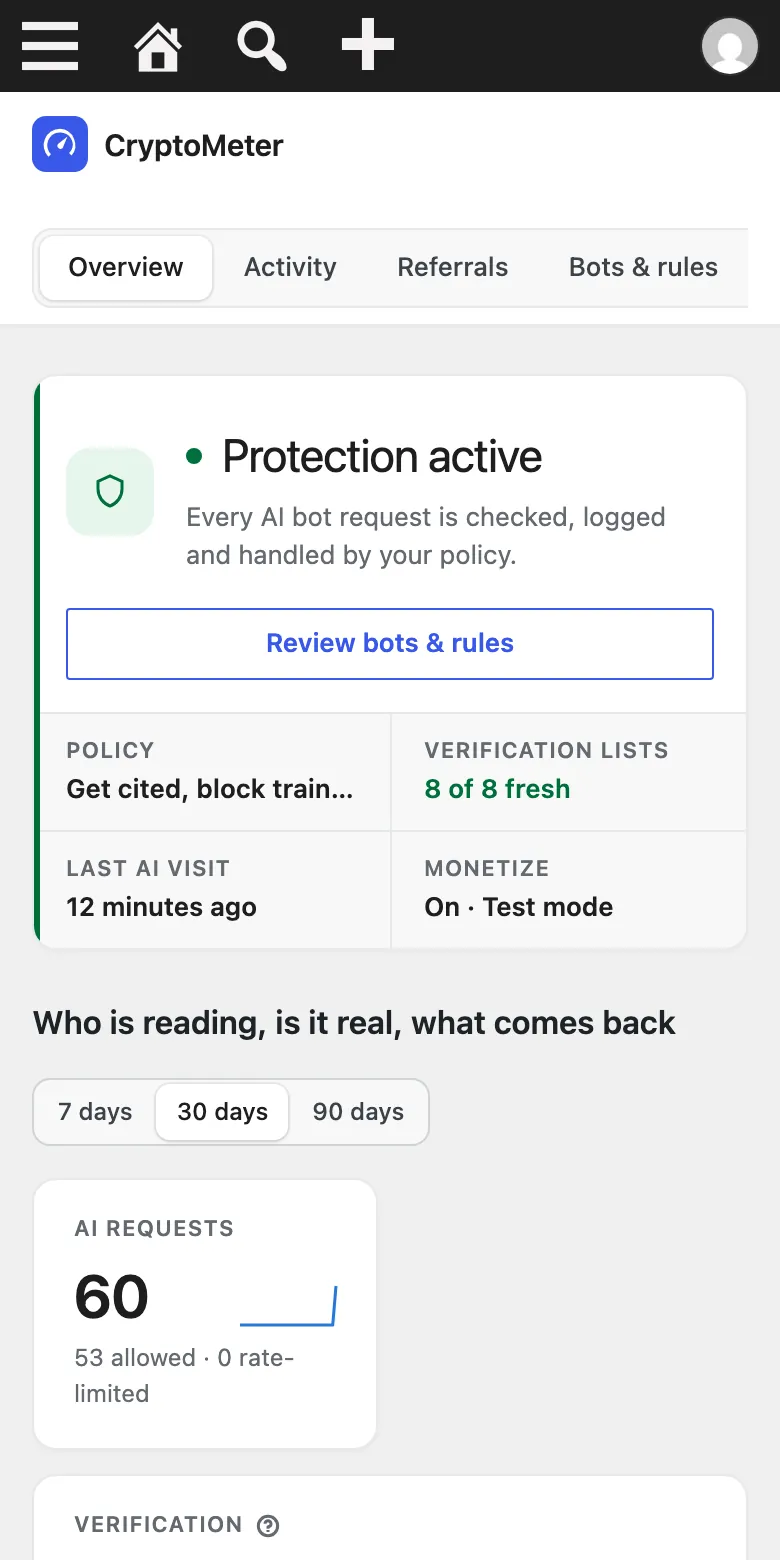
Real screenshot from a local test install with test traffic (numbers are not from a live site). The admin is responsive down to phone width.
What it solves
A robots.txt file alone does not tell you which bots came, whether they were real, whether they listened, or whether anything came back.
Wikimedia reported bandwidth used for downloading multimedia content grew 50% since January 2024, driven mostly by automated scrapers.
Source: Wikimedia, 2025Anyone can send “Googlebot” or “GPTBot” in a header. Without checking the IP, reverse DNS or a signature, a scraper looks like a trusted crawler.
Well-behaved bots follow it; others do not. You need enforcement on the server and a record of who ignored the rules.
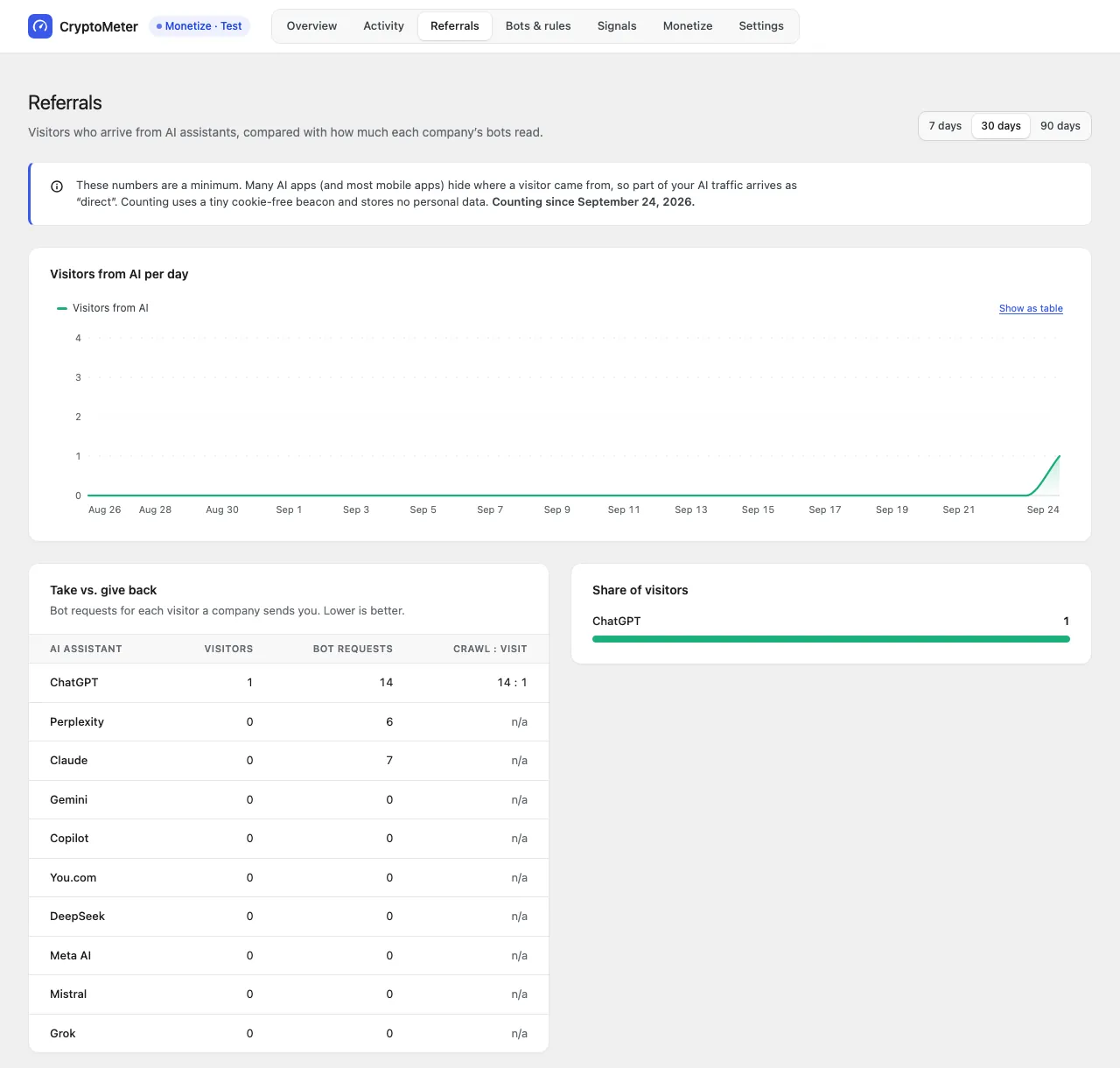
AI assistants read a lot and link back rarely. The useful number is your own: requests per vendor versus visitors that vendor sends.
Five pillars
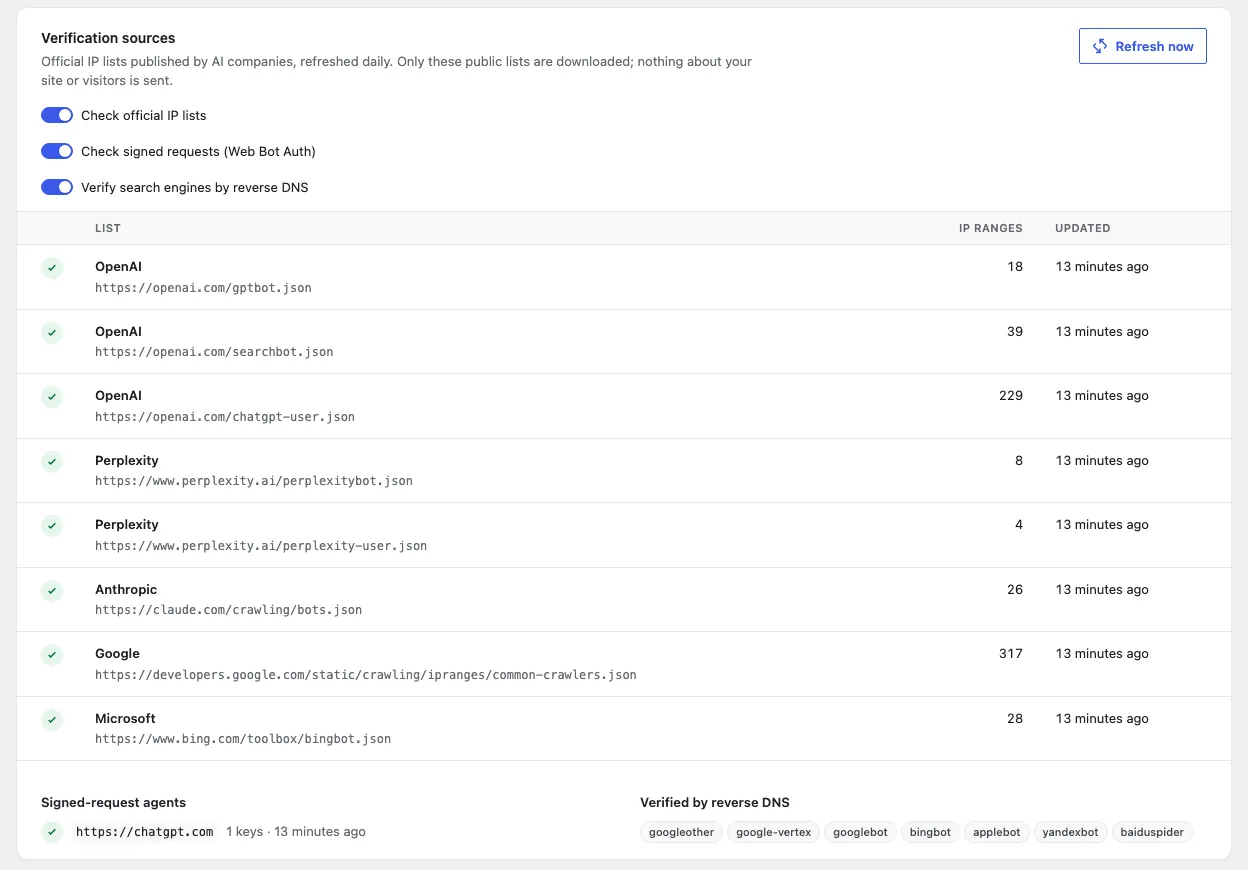
8 official IP lists from OpenAI, Perplexity, Anthropic, Google and Microsoft, reverse DNS for search engines, and Web Bot Auth signatures.
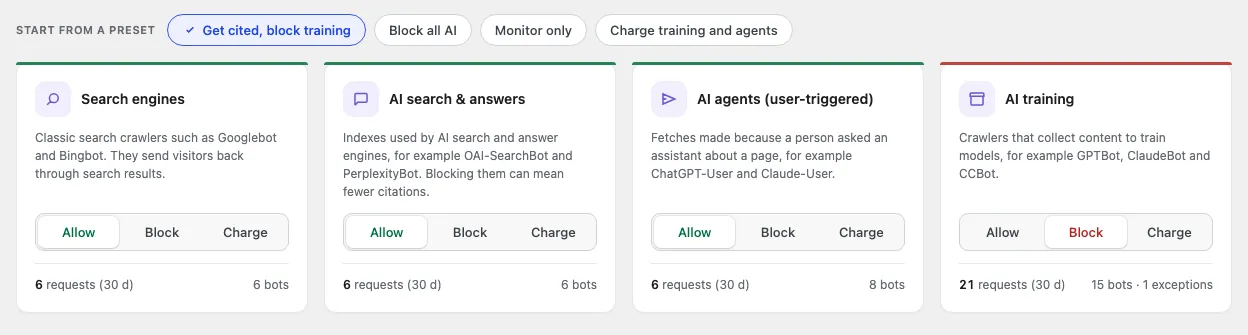
Search, AI search, AI agents and AI training each get Allow or Block, with per-bot exceptions and rate limits.
Activity log, live feed, AI referrals with a crawl-to-visit ratio per vendor, robots.txt violations, weekly report.
04 · One policy → every signalrobots.txt, Content-Signal, IETF Content-Usage, RSL, TDMRep, noai — plus server and cache rules.
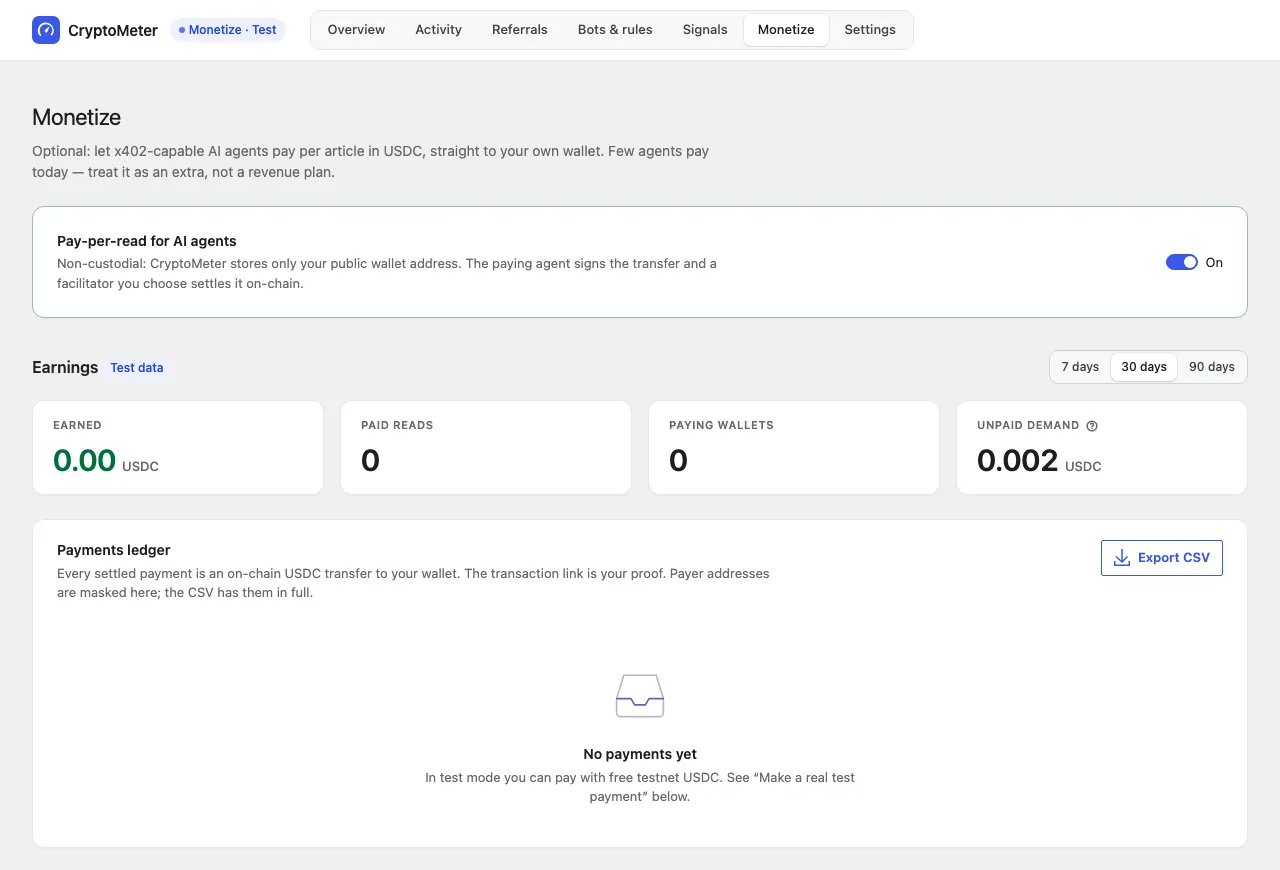
05 · Monetize (optional)Off by default. Agents that can pay send USDC straight to your wallet. Non-custodial.
Every bot request is checked against the vendor’s own published data. Scrapers that borrow a well-known name are flagged and, by default, blocked.
Verification is only as good as each vendor’s published data. A bot without an IP list, DNS or signature method is shown as unverified, never as spoofed.
Four intents that match how AI companies describe their bots. Pick a preset, then make exceptions where you need them.
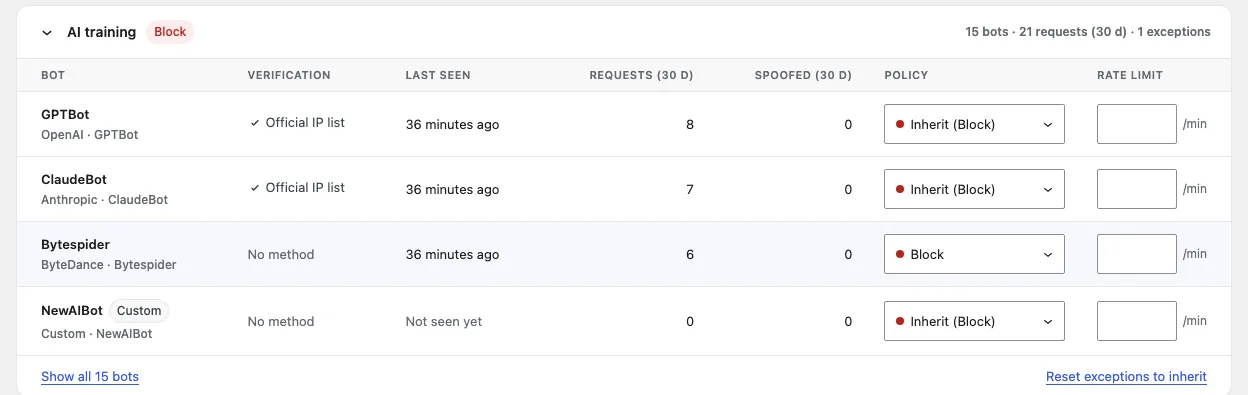
Your own numbers, collected on your own server — with a clear “collecting since” date and no demo data.
Referral counts are a lower bound: many AI apps and mobile apps hide where a visitor came from, so part of that traffic arrives as “direct”.
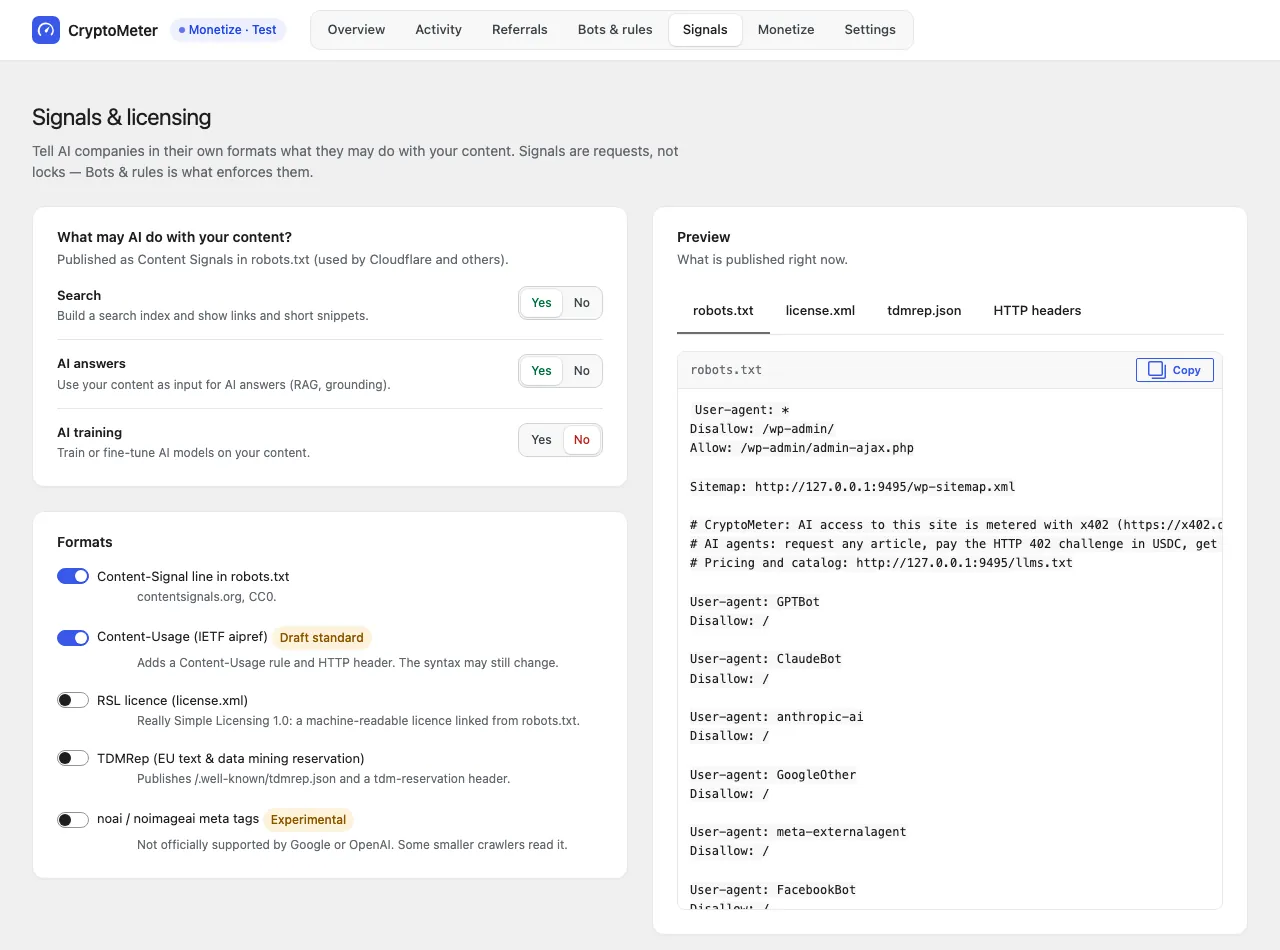
Answer three questions (search, AI answers, AI training) and CryptoMeter publishes them everywhere, with a live preview before you save.
/license.xml with License: and Link rel="license"; TDMRep /.well-known/tdmrep.json with tdm-reservation headers; optional noai meta (experimental).Signals are declarations, not enforcement. Bots that respect them follow them; the Block policy and server rules are what actually stop requests.
Turn it on and bots set to Charge get an HTTP 402 with a standard x402 challenge. An x402-capable agent signs a USDC payment and receives the article.
Few AI agents can pay today. Treat Monetize as an extra, not a revenue plan — CryptoMeter makes no earnings promise.
Workflow
A setup card on the Overview asks one question: how should AI bots be treated? The wallet is optional and can be added later.
Requests appear in the Activity log with a verdict. Lists refresh daily; spoofed bots are blocked.
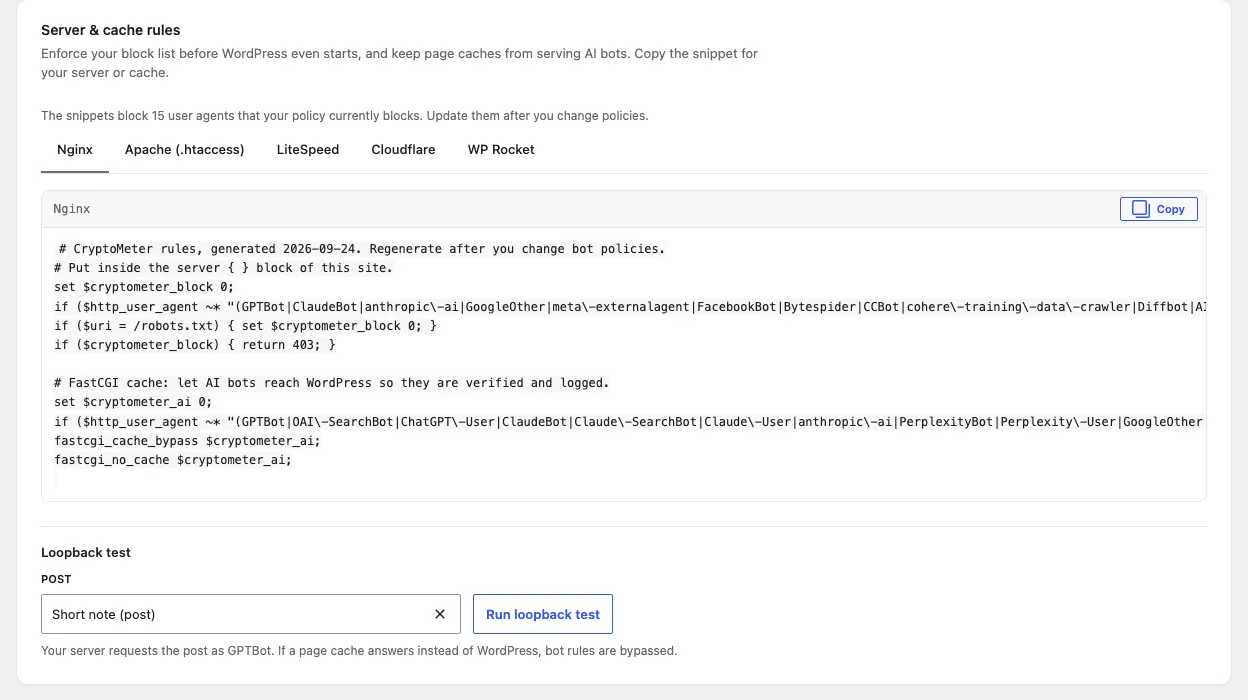
Add exceptions and rate limits, publish signals, and copy the server or cache snippet if you use a page cache.
The weekly report and spike alert tell you who read, who was real, and what came back.
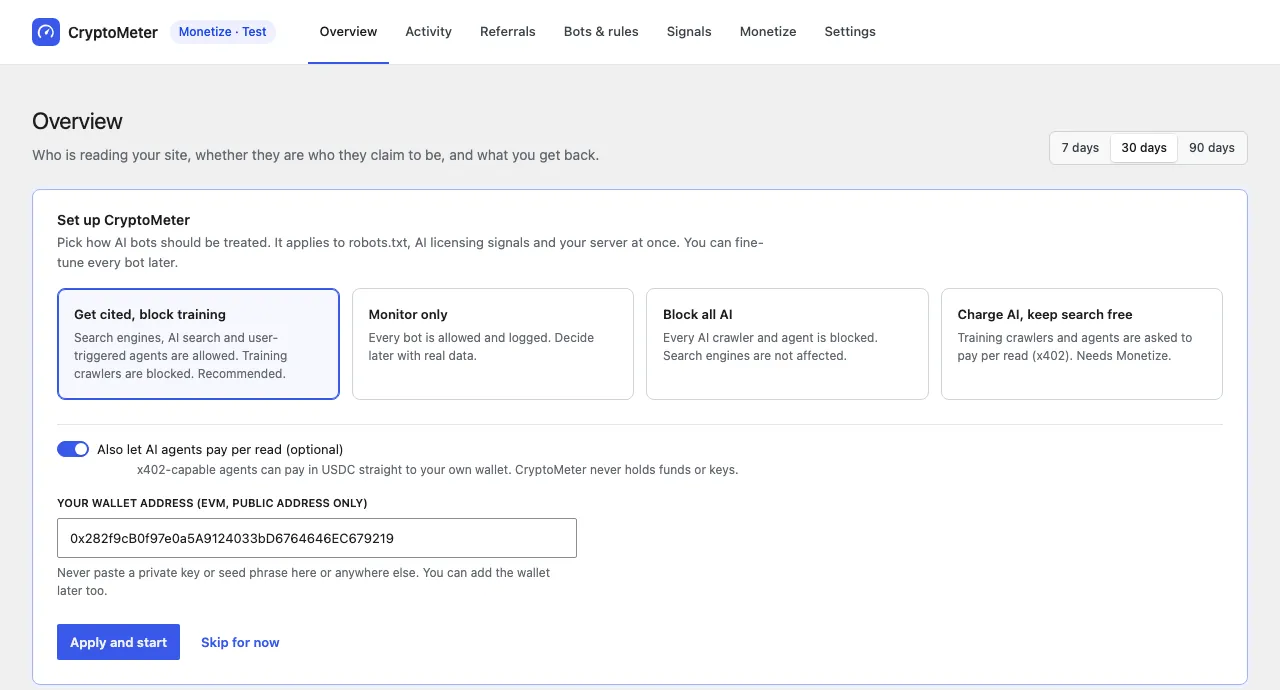
Admin tour
Built with WordPress’ own components, follows your admin colour scheme, keyboard accessible, and honest when there is no data yet.
No public live demo yet. Every image below is a real screenshot from a local test install with test traffic. On localhost all requests come from 127.0.0.1, so most verdicts read “Unknown” or “Unverified”; on a public site, requests from listed vendor IPs show “Verified”.
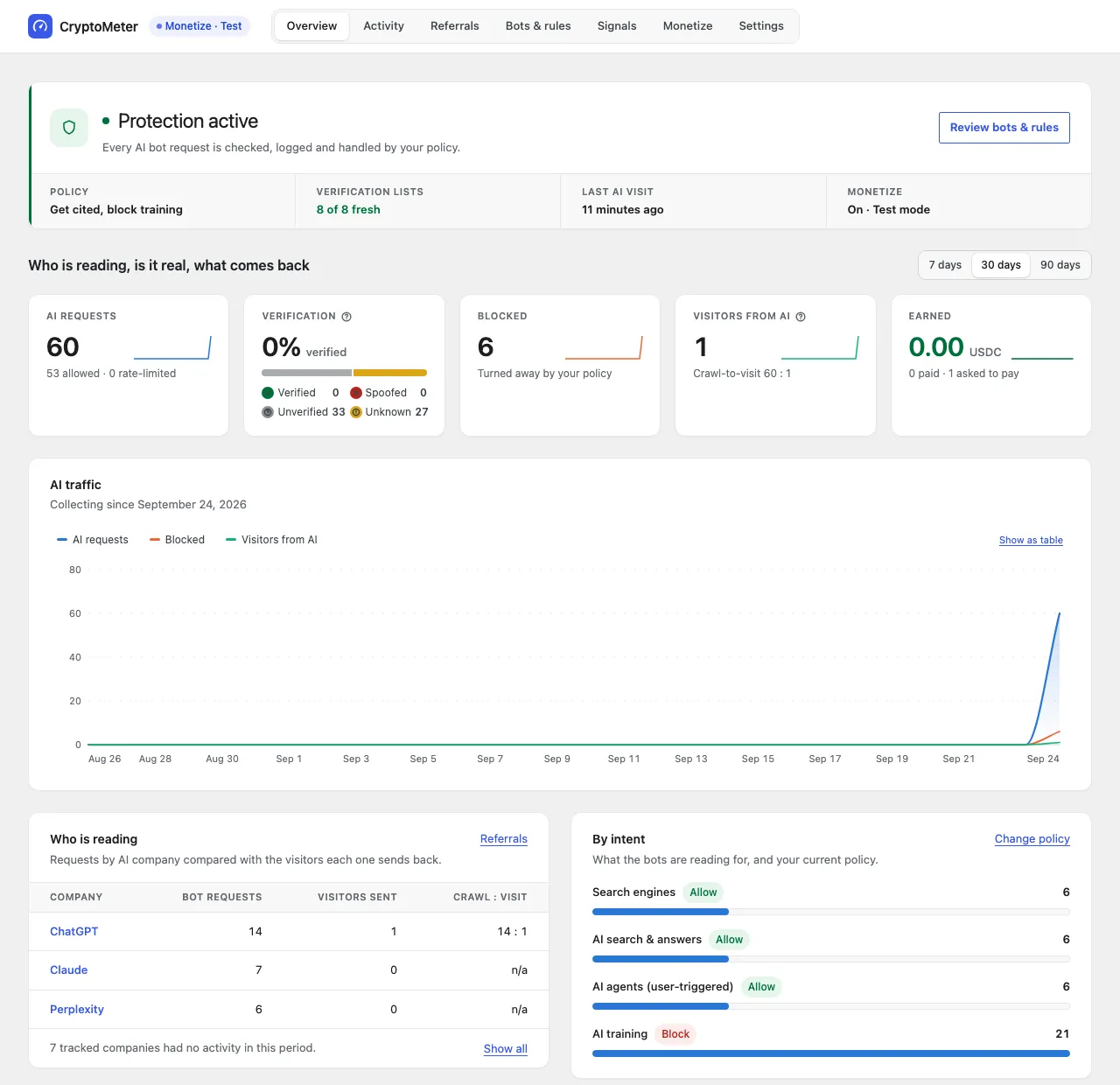
Who is reading, is it real, and what comes back — on one screen, for 7, 30 or 90 days.
Feed or table view, live mode, filters for bot, company, intent, verification and decision, and an “ignored robots.txt only” switch.
Counted with a tiny cookie-free beacon, so page caches cannot hide visits. No personal data is stored.
Policies, verification sources and server & cache rules in one place.
Preview robots.txt, license.xml, tdmrep.json and HTTP headers before you save.
Optional. Off by default. Test mode with testnet USDC before going live.
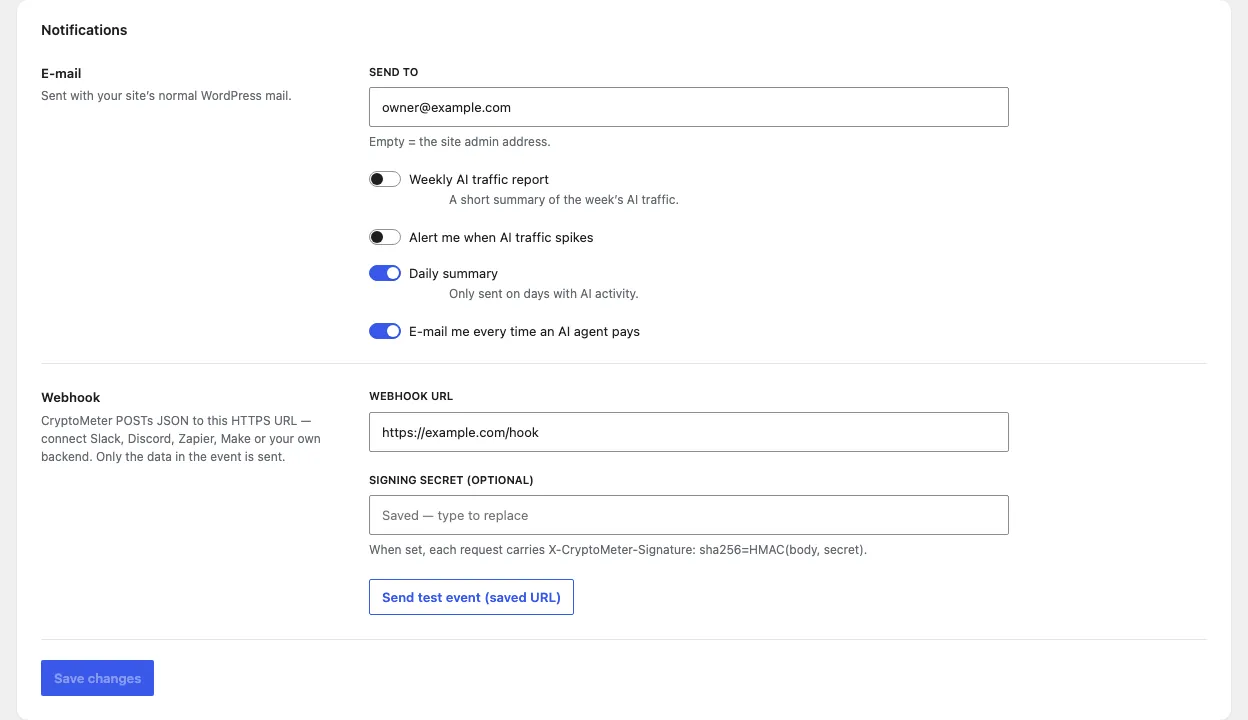
Weekly report, spike alert, daily digest and a signed webhook for Slack, Discord, Zapier or your own backend.
Privacy & security
No CryptoMeter account, no cloud dashboard. The only outbound requests fetch public lists and keys — and they are listed below.
Normal visitors and logged-in users are never logged, blocked or metered. Search engines read free by default.
The bot log stores the network prefix (IPv4 /24, IPv6 /48), never the full address. The referral beacon uses no cookies and stores no IP.
Log retention setting (90 days by default), one-click erase of the log, referrals, test payments or all statistics, and suggested privacy-policy text.
Every request has a timeout; a failure never affects your visitors, and the last good copy of each list is kept.
The real visitor IP is read from CF-Connecting-IP only when the request comes from a Cloudflare address.
Monetize stores only a public wallet address. CryptoMeter never asks for a private key or seed phrase.
openai.com/gptbot.json, openai.com/searchbot.json, openai.com/chatgpt-user.json, www.perplexity.ai/perplexitybot.json, www.perplexity.ai/perplexity-user.json, claude.com/crawling/bots.json, developers.google.com/static/crawling/ipranges/common-crawlers.json, www.bing.com/toolbox/bingbot.json.chatgpt.com/.well-known/http-message-signatures-directory, at most once a day (switchable).Honest expectations
Stack
| Plugin | PHP WordPress plugin, own database table for the bot log, WP-Cron jobs |
|---|---|
| Admin | React app built with @wordpress/scripts and @wordpress/components; source and build included |
| API | WordPress REST API (admin routes require an authorised user) |
| Signatures | Ed25519 via PHP sodium; falls back to IP list and DNS if unavailable |
| Charts | Lightweight SVG, no chart library |
| Front end | One tiny cookie-free referral beacon; nothing else added for visitors |
| Standards | RFC 9421Content SignalsIETF aipref (draft)RSL 1.0TDMRepx402 v2 |
Requirements
| WordPress | 6.6 or newer |
|---|---|
| PHP | 7.4 or newer |
| Tested on | PHP 7.4.33 and 8.4.25 with SQLite; built-in self-test passes 173 of 173 checks on both |
| MySQL / MariaDB | Not yet tested |
| Server | Outbound HTTPS for the daily IP-list refresh (optional, switchable) |
| Page cache | Must let AI user agents reach WordPress — snippets for nginx, Apache, LiteSpeed, Cloudflare and WP Rocket are generated |
| Monetize only | An EVM wallet address (public) and an x402 facilitator |
What you get
wp eval-file; no network callsDocumentation
The full buyer documentation will be linked here when it is public. It covers installation, presets, verification sources, page caches, Cloudflare and proxies, signals, Monetize test mode, the webhook format, developer hooks and uninstall.
Changelog
First public release.
FAQ
It stops the scraping you can identify. Known AI bots you set to Block get HTTP 403, bots that fake a known identity are blocked as spoofed, per-bot rate limits return 429, and you can block generic HTTP clients such as curl or python-requests.
It cannot stop a scraper that fully imitates a normal browser — that traffic looks like a human visitor, and humans are never blocked.
Search engines (Googlebot, Bingbot and others) read free by default, and every preset keeps them allowed. Blocking AI training crawlers such as GPTBot or ClaudeBot does not affect Googlebot.
Note: Google’s AI Overviews use the normal search index, so they cannot be turned off separately without leaving Google Search.
It is designed to keep personal data to a minimum: humans are never logged, the bot log stores only the IP network prefix (IPv4 /24, IPv6 /48), the referral beacon uses no cookies and stores no IP, data stays on your server, and you control retention and erasure. A suggested privacy-policy text is included.
Whether your whole site is compliant depends on everything else it runs — CryptoMeter does not give legal advice.
No. Verification, policies, activity, referrals, signals and rules all work without any wallet. Monetize is off by default; only if you turn it on do you need a public EVM wallet address to receive USDC.
28 known AI crawlers and agents (including ChatGPT agent, recognised by its signature) and 6 search engines, grouped into four intents. You can add your own user agents, and developers can extend the list with a filter.
Verified: the IP is in the vendor’s official list, reverse DNS confirms it, or a Web Bot Auth signature is valid. Spoofed: the bot claims a name that can be checked and the check definitely failed. Unverified: the vendor publishes no way to check. Unknown: the check could not decide (for example a private or proxy IP, or a list not fetched yet).
Yes, with configuration. Caches that answer before WordPress loads must let AI user agents through; CryptoMeter generates snippets for nginx, Apache, LiteSpeed, Cloudflare and WP Rocket and has a loopback test. Behind Cloudflare, the real IP is read automatically from Cloudflare addresses.
CryptoMeter makes no such claim. They are machine-readable declarations; bots that respect them follow them. Enforcement is done by the Block policy and server rules.
A tiny script counts visits whose referrer or utm_source shows an AI assistant, so page caches cannot hide them. Many AI apps and mobile apps send no referrer, so those visits look “direct” — the real number of AI visitors can only be higher.
Maybe a little, maybe nothing. Only x402-capable agents can pay, and few do today; large crawlers mostly do not. Money goes straight to your wallet when they do. Treat it as an extra.
Settings, the bot log, referral and traffic statistics, cached lists and keys and scheduled tasks are removed. The payments ledger is kept as your accounting record unless you opt in to delete it too.
One purchase on CodeCanyon. No monthly fee, no event cap, no data leaving your site.
Not yet published on CodeCanyon — the buy link will go live with the listing. Purchases happen on Envato Market.
Price shown on the item page applies. Licence terms are Envato’s.
Support
Buyers get item support through the CodeCanyon item page under Envato’s item-support terms. Please include your WordPress and PHP versions and the Tools & status report from the plugin.
Before you ask
Settings → Tools & status shows the system status and page-cache detection; the loopback test shows whether a cache is in the way; the self-test checks the core logic without network calls.